Investment account login and support
Log in to your account: There are two ways to log in to your DCP, JRA or Plan 3 investment account. Choose the option that works for you.


Which login should I use?
Use this option if you have a DRS plan account. Most customers use this method to access both pension and investment information from one place.
After logging in, select My Investments and choose your plan. Need help logging in?
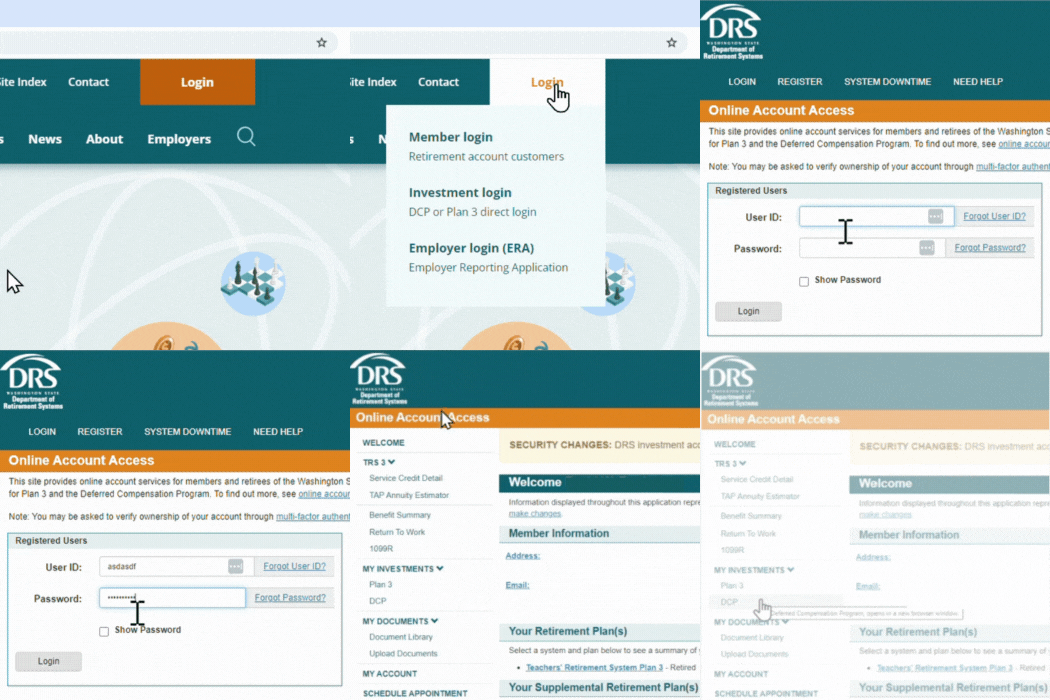
Use this option if you don’t have a DRS pension account, such as legal order payees or investment beneficiaries. Some customers also prefer to log in to their investment account directly.

Need help with your investment account?
Contact the recordkeeper:
Call Voya: 888-327-5596
TTY: 711
Chat: Available from the Voya login page or after you log in
Fax: 844-449-2546

Mailing address:
Voya Financial
Attn: Washington State DRS
PO Box 389
Hartford, CT 06141
About the record keeper
Voya Financial is the DRS record keeper for DCP, Plan 3 and JRA investment accounts. They maintain account records and help with transactions and account information. The DRS podcast episode shares more record keeper information.
Received a PIN letter?
This letter is from the DRS record keeper, Voya Financial. You can use the PIN to log in to your investment account or make account changes by phone. For questions about your PIN, contact Voya.
- Voya Financial Sept 21, 2020 to present
- Empower (previous name was Great-West) 2010-2020
- ICMA-RC (now Mission Square) 1996-2016
- CitiStreet (sold to ING in 2008, rebranded to Voya Financial in 2014) 2000-2010
Overlaps in dates mean DCP and Plan 3 had different record keepers simultaneously.