PERS Plan 2
Public Employees’ Retirement System (PERS) Plan 2 is a 401(a) lifetime retirement pension plan available to public employees in Washington. You and your employer contribute a percentage of income to fund the plan.
Your contributions
PERS Plan 2 employee contribution rate: 5.38%
This is the percentage of your salary that goes toward your pension retirement income. More about contributions.
See a live or recorded Plan 2 webinar.
How much will your pension be?
Estimate your retirement benefit in minutes using the personalized Benefit Estimator in your online account. Your total pension amount is based on your years of service and your income. See more about how we calculate your benefit.
How to estimate your benefit
-
- From the DRS homepage, select the Member Login button in the top right.
- Log in to your online account.
- In the menu bar, select your plan name – such as PERS 2. This will open a dropdown menu.
- Select Benefit Estimator.
- Read how to use the estimator and select Accept & Continue.
- For first-time users, we recommend using the four-step process. This helps you learn how your benefit is calculated.
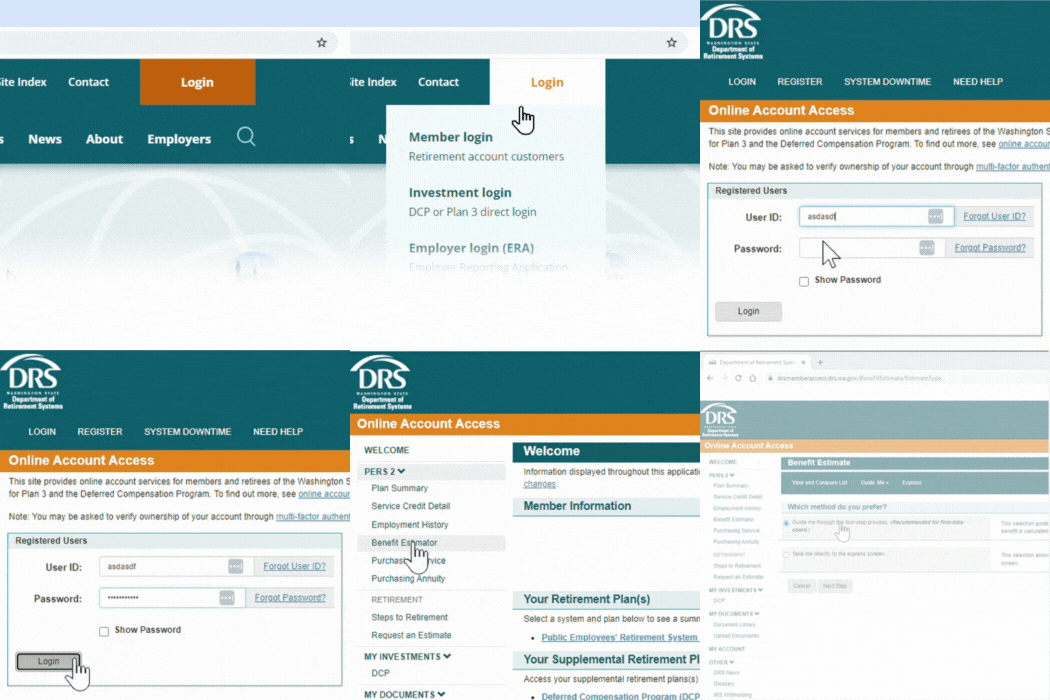
You can use this tool at any point in your career. You can create an estimate using different factors as many times as you like. This calculator will allow you to see a private preview of what your monthly retirement income might look like.
Years of service
Your service credit is the number of years you work in public service. This time is reported by your employer. You receive one service credit each calendar month in which you are compensated for 90 or more hours of work. You can earn no more than one month of service credit each calendar month, even if more than one employer is reporting hours you work.
You receive one-half of a service credit if you work fewer than 90 hours but at least 70 hours in a calendar month. You receive one-quarter of a service credit if you are compensated for fewer than 70 hours in a calendar month. Review your service credit detail through your online account.
More about service credit.
Your income
The Average Final Compensation, or AFC is the average of your 60 consecutive highest earning months in your career. This could be at the beginning, middle or end of your career. DRS uses your AFC income information to calculate your pension amount. For high income public employees, federal law limits the amount you can contribute toward retirement and limits the benefit calculation. See IRS limits.
PERS Plan 2 formula
2% x service credit years x Average Final Compensation = monthly benefit
Example:
Let’s say you work 23 years and the average of your highest 60 consecutive months of income (AFC) is $5,400 per month.
2% x 23 years x $5,400 = $2,484
When you retire, you’d receive $2,484 per month.
When can you retire?
Now that we’ve discussed how much money you can get in retirement, let’s talk about when you can retire. You need 5 or more years of service to qualify for a retirement with PERS Plan 2. Full retirement age is 65. You can also choose to retire as early as age 55, but your benefit could be reduced depending on your total years of service.
You need 5 years of service
With PERS Plan 2, you need five years of service to qualify for a retirement. Once you have five years, you are a “vested” member. Five is the minimum, but you can earn an unlimited number of years to increase your pension amount.
Full retirement
Full retirement is the earliest age you can retire without any reduction to your retirement benefit. For PERS Plan 2, this is when you reach age 65. If you have 30 or more years of service and you are age 62, you can also retire with a full benefit. What if you want to retire younger than age 65 and you don’t have 30 years of service?
Early retirement
If you retire before age 65, it’s considered an early retirement. If you have at least 20 years of service credit and are 55 or older, you can choose to retire early, but your benefit will be reduced. There is less of a reduction (in some cases no reduction) if you have 30 or more years of service credit.
If you have 30 or more years of service and you are age 62, you can retire with a full benefit under the 2008 ERF.
How does retiring early affect my monthly benefit?
When you retire early, your monthly benefit amount is reduced to reflect that you will be receiving your pension payments for a longer period of time. The amount of the impact depends on the amount of service credit you have, the date you retire and your age. (See “Early retirement benefit formulas” below.)
If you retire early with 20 – 30 years of service credit, your monthly benefit is reduced by a factor that is based on your average life expectancy. Early retirement factors are subject to change based on State Actuary figures. The reduction is greater than if you retire with at least 30 service credit years.
Early retirement factors
Actuarial early retirement factors, for those with less than 30 years of service, vary by system and plan and are updated at least every six years. See current early retirement factors for Plan 2 members with at least 20 years or Plan 3 members with at least 10 years of service.
- Plan 2: Need at least 20 years of service credit to qualify
- Plan 3: Need at least 10 years of service credit to qualify
Early retirement factors for less than 30 years of service
| Retirement age | Factor |
|---|---|
| 55 | 0.4092 |
| 56 | 0.4450 |
| 57 | 0.4844 |
| 58 | 0.5280 |
| 59 | 0.5760 |
| 60 | 0.6292 |
| 61 | 0.6882 |
| 62 | 0.7538 |
| 63 | 0.8269 |
| 64 | 0.9085 |
Early retirement factors for 30 or more years of service
| Retirement Age | 2008 ERF |
|---|---|
| 55 | 0.80 |
| 56 | 0.83 |
| 57 | 0.86 |
| 58 | 0.89 |
| 59 | 0.92 |
| 60 | 0.95 |
| 61 | 0.98 |
| 62 | 1.00 |
| 63 | 1.00 |
| 64 | 1.00 |
If I retire early, what reductions will apply?
The amount of the reduction to your monthly benefit depends on how much younger than age 65 you are when you retire and the amount of service credit you have. This reduction reflects that you will be receiving your defined benefit for a longer period of time than if you had retired at age 65. Consider how the ERFs are applied in the early-retirement examples shown below.
For more information on early retirement, read Washington Administrative Code 415-02-320.
Plan 2 early-retirement formula
2% x service credit years x Average Final Compensation (AFC) x ERF = monthly benefit
Returning to work could affect your retirement income. See working after retirement.
Early retirement examples
How much difference can early retirement make? That depends on your circumstances, including your wages and age at retirement. Consider the examples below. The administrative factors used in these examples are for illustrative purposes only.
Example 1: Fewer than 30 years
Customer retires Sept. 1, at age 55 with 22 years of service credit.
Their AFC is $3,600. They are retiring early, so using the administrative factor (above table) the monthly benefit is 40.92% of what it would have been at age 65, calculated as follows:
= 2% x 22 years x $3,600 x 40.92%
= 0.02 x 22 x $3,600 x 0.4092
= $648.17 per month
Example 2: 30 or more years
Customer retires April 1, at age 60 with 30 years of service credit using the 2008 ERF.
If they choose to retire under the 2008 ERF, their benefit is reduced by 5% (due to age). The 2008 ERF monthly benefit would be calculated as follows:
= 2% x 30 years x $4,400 x 95%
= 0.02 x 30 x $4,400 x 0.95
= $2,508
If you retire before age 65, it’s considered an early retirement. If you have at least 20 years of service credit and are 55 or older, you can choose to retire early, but your benefit will be reduced. There is less of a reduction if you have 30 or more years of service credit.
If you were hired on or after May 1, 2013 and retire early (age 55-64) with 30 years of service credit, your benefit will be reduced by 5% for each year (prorated monthly) before you turn age 65.
How does retiring early affect my monthly benefit?
When you retire early, your monthly benefit amount is reduced to reflect that you will be receiving your pension payments for a longer period of time. The amount of the impact depends on the amount of service credit you have, the date you retire and your age. (See “Early retirement benefit formulas” below.)
If you retire early with 20 – 30 years of service credit, your monthly benefit is reduced by a factor that is based on your average life expectancy. Early retirement factors are subject to change based on State Actuary figures. The reduction is greater than if you retire with at least 30 service credit years.
Early retirement factors
Actuarial early retirement factors, for those with less than 30 years of service, vary by system and plan and are updated at least every six years. See current early retirement factors for Plan 2 members with at least 20 years or Plan 3 members with at least 10 years of service.
- Plan 2: Need at least 20 years of service credit to qualify
- Plan 3: Need at least 10 years of service credit to qualify
Early retirement factors for less than 30 years of service
| Retirement age | Factor |
|---|---|
| 55 | 0.4092 |
| 56 | 0.4450 |
| 57 | 0.4844 |
| 58 | 0.5280 |
| 59 | 0.5760 |
| 60 | 0.6292 |
| 61 | 0.6882 |
| 62 | 0.7538 |
| 63 | 0.8269 |
| 64 | 0.9085 |
Early retirement factors for 30 or more years of service
| Retirement age | 5% ERF |
|---|---|
| 55 | 0.50 |
| 56 | 0.55 |
| 57 | 0.60 |
| 58 | 0.65 |
| 59 | 0.70 |
| 60 | 0.75 |
| 61 | 0.80 |
| 62 | 0.85 |
| 63 | 0.90 |
| 64 | 0.95 |
If I retire early, what reductions will apply?
The amount of the reduction to your monthly benefit depends on how much younger than age 65 you are when you retire and the amount of service credit you have. This reduction reflects that you will be receiving your defined benefit for a longer period of time than if you had retired at age 65. Consider how the ERFs are applied in the early-retirement examples shown below.
For more information on early retirement, read Washington Administrative Code 415-02-320.
Plan 2 early-retirement formula
2% x service credit years x Average Final Compensation (AFC) x ERF = monthly benefit
Returning to work could affect your retirement income. See working after retirement.
Early retirement examples
How much difference can early retirement make? That depends on your circumstances, including your wages and age at retirement. Consider the examples below. The administrative factors used in these examples are for illustrative purposes only.
Example 1: Fewer than 30 years
Customer retires Sept. 1, at age 55 with 22 years of service credit.
Their AFC is $3,600. They are retiring early, so using the administrative factor (above table) the monthly benefit is 40.92% of what it would have been at age 65, calculated as follows:
= 2% x 22 years x $3,600 x 40.92%
= 0.02 x 22 x $3,600 x 0.4092
= $648.17 per month
Example 2: 30 or more years
Customer retires April 1, at age 62 with 30 years of service credit using the 5% ERF.
If they choose to retire under the 5% ERF, their benefit is reduced 5% for each year before age 65. In this case, they are retiring 3 years early, so 5% three times equals a 15% reduction from 100% (so 85%). The 5% ERF monthly benefit would be calculated as follows:
= 2% x 30 years x $4,400 x 85%
= 0.02 x 30 x $4,400 x 0.85
= $2,244
See a live or recorded early retirement webinar.
See a live or recorded early retirement webinar.
How do you retire?
When you are within 12 months of retiring, you can start the official retirement process with DRS. First, you request an official benefit estimate. Once you receive the estimate, you complete and submit your application to retire. See this steps to retire with a pension video.
1. Request an official benefit estimate from DRS 3 to 12 months prior to your retirement date. Make this request through your online account or by contacting us. In most cases, we will provide your estimate 5 to 8 weeks before your retirement date. If you haven’t received your requested estimate within 5 weeks of your retirement date, contact us.
Estimates are prioritized by retirement date, which allows DRS to use the most recent information available for you and gives you ample time to submit your retirement application. An official benefit estimate is not the same as the benefit estimator tool available to all customers. To assist your retirement planning any time before or after requesting your official benefit, you can use the benefit estimator tool through your online account.
2. Apply for retirement through your online account. After receiving your official benefit estimate, we recommend completing the application at least 3 to 5 weeks before the date you intend to retire. If you can’t make this timeline, contact us as soon as possible so we can help keep your retirement on track. Members of more than one system will need to complete a paper application.
Estimate your retirement income
You can use the benefit estimator tool in your online account to help plan for retirement at any point—while you are still working, and even after you submit an official request to retire. Log into your online account and select the benefit estimator tool to get started.
When do you get paid?
Your pension money will be direct deposited into your bank account on the last business day of the month, every month, for the rest of your life. The retirement application has a section for your bank information so your funds will be deposited. Once you’ve retired, you can make any updates to your direct deposit through your online account.
Separation vs retirement
You are retired from DRS when you separate from employment and begin collecting your pension. If you leave public employment, but you are not yet collecting a pension, we consider you separated, but not retired. These instructions assume you are separating and will be collecting your pension (retiring).

See live or recorded retirement planning webinars.
How can you increase your pension amount?
You can increase your PERS 2 pension benefit by increasing your years of service or your income. But when it comes to total retirement income, you have more options.
DCP savings program
The Deferred Compensation Program or DCP is a voluntary savings program you can use to increase your retirement savings. DCP uses many of the same investment options available to Plan 3 members, including investments that are managed for you. With DCP, you control your contribution amount so your savings can grow with you. Saving an additional $100 a month now could mean an extra $100,000 in retirement!
(Example based on 6% annual rate of return over 30 years of contributions.) More about DCP.
Sick leave cashouts
Some employers allow leave cash outs when you separate from employment. These sick leave or vacation cashouts might be a good way to increase your DCP savings when you end your employment. Contact your employer to see what options are available to you.
Annuity options
What’s an annuity?
The annuities offered by Washington state let you convert your savings into guaranteed monthly income for the rest of your life. When you purchase an annuity, you move your money out of market risk and create a steady, predictable income stream.
Annuities are the only investment withdrawal option that ensures you won’t outlive your account balance. Once your annuity is set up, the income amount and terms cannot be changed or canceled.
DRS administers annuities offered by Washington state with investments provided by the Washington State Investment Board.
Yes. Like your pension, once you start receiving payments, the money will be taxed as ordinary income.
Each year you’ll receive a statement that shows the taxable amount of your annuity. DRS is required to withhold a certain amount of federal taxes.
- Complete a W-4P form for tax withholding.
- If you don’t submit a W-4P, withholding will default to IRS guidelines, (single with no adjustments).
For more details, review IRS Publication 575 or consult a tax advisor. DRS and the record keeper cannot provide tax advice.
The amount depends on the purchase price as well as factors like your age and survivorship option. You can estimate your annuity cost and added monthly income by logging into your online account and selecting Purchasing Service or Purchasing Annuity.
To purchase the Plan and/or Service Credit annuity, select one or both annuities when you retire online. If you complete a paper retirement application, let DRS know you’re considering an annuity. This will allow us to include an annuity estimate along with your retirement estimate.
Compare annuities
| Feature | Plan annuity | Service credit annuity |
|---|---|---|
| Limits | Minimum purchase: PERS, PSERS, SERS: $5,000 TRS: no min LEOFF, WSPRS: $25,000 No maximum for any plan. | Purchase 1-60 months of service credit |
| Funding source | Purchase with pretax governmental retirement savings (DCP 457, 403b, TSP). TRS also has a cash option. (See Annuity FAQ) | Purchase with cash or pretax savings (DCP 457, 403b, TSP, IRA, 401k). |
| Eligibility | Available at retirement. | Available at retirement. |
| Survivor option | Same as your pension survivor. (WSPRS 1, survivor paid only with Option B.) | Same as your pension survivor. |
| Will I receive a COLA? | COLA up to 3% annually. For TRS or PERS 1 member, COLA is optional at retirement. | COLA up to 3% annually. For TRS or PERS 1 member, COLA is optional at retirement. |
| Continues if returning to work | Yes. | Yes, as long as you follow the hourly limits. |
| Service credit impact | N/A | Increases monthly benefit, but does not change years of service. |
| Timing | Can only purchase when applying for retirement. | Can only purchase when applying for retirement. |
| The amount paid to you | Based on purchase amount from funding source. | Based on same pension formula as retirement benefit. |
| Can be used to qualify for retirement | No. | No. |
| How will I receive this money? | Combined with your pension check. | Combined with your pension check. |
Both annuities use the same calculation factors, so the cost and benefit increase are identical. The main difference lies in the funding sources and payment features. You’re not limited to one annuity, you can purchase both.
If you (and your survivor, if applicable) pass away before the full purchase amount is paid out, your beneficiaries will receive the remaining balance.
The rules for each retirement plan are decided by the Washington state legislature and can vary.
PERS plan annuity
This annuity is available to all PERS, SERS and PSERS retirement plan members. With this annuity, your survivor will be the same as the one you selected for your pension payment. You can use your DCP savings to purchase this annuity in addition to other approved funding sources. If you return to work, this annuity continues.
When can I purchase?
When you are retiring.
Are there limits to the annuity amount I can purchase?
Yes, the minimum purchase amount is $5,000. There are no maximum limits.
How much does it cost?
Log in to your account and choose “Purchasing Annuity.” Here you can find the monthly increase to your pension for any purchase amount.
What funds can I use to purchase an annuity?
Your payment must come from an eligible governmental plan, like your pretax DCP savings. Members cannot use PERS/SERS/TRS Plan 3 contributions to pay for this annuity.
When does my annuity benefit begin?
Your retirement date or the day after your bill for the annuity is paid in full, whichever comes later.
How often do I receive my annuity benefit?
Monthly.
Can I designate a survivor?
Yes. Your survivor must be the same survivor and survivor option you chose for your retirement benefit.
Will I receive a Cost-of-Living Adjustment (COLA)?
Yes. You will receive a COLA up to 3% annually. If you’re a Plan 1 member, a COLA is optional at retirement and your choice will also apply to this annuity purchase.
How do I purchase this annuity?
Request this annuity when you retire online. You can also purchase it when completing a paper retirement application.
Can I cancel the annuity if I change my mind?
In most cases, no. Annuities are fixed income sources. Once you purchase the annuity, you will not have access to the funds you used to make the purchase.
There are two exceptions:
If you have not completed the annuity purchase, you can still change or cancel the annuity.
Once you make the purchase, you’ll have 15 days to cancel the transaction. You’ll receive a mailed contract that includes your rescission, or cancel by date.
Will my annuity purchase be refunded if I die?
If you (and your survivor if you selected a survivor option) die before the amount of your annuity purchase has been paid back to you, the difference will be refunded to your beneficiary.
What if I return to work?
Your annuity continues.
Purchase service credit annuity
Purchasing additional service credit increases your monthly retirement benefit for the rest of your life. You can purchase between one and 60 months of service credit in whole months. Purchasing service credit will increase your monthly benefit, but it will not increase the years of service posted on your account. The increase to your benefit is calculated using the same formula as your retirement benefit. This additional service credit is available at the time of your retirement only. Also, you cannot use the additional credit to qualify for retirement (it won’t increase your years of service).
When can I purchase?
When you are retiring.
Are there limits to the amount of service credit I can purchase?
Minimum: One month; Maximum: 60 months.
How much does it cost?
Log in to your account and choose “Purchasing Service.” Here you can find the estimated cost and income increase per month you purchase.
What funds can I use to purchase service credit?
You can use any funds except for Plan 3 contributions. Funds rolled over from your DCP account must be pretax.
When does my annuity benefit begin?
After you have made payment in full.
How often do I receive the benefit?
Monthly.
Can I designate a survivor?
Yes. Your survivor will be the same option you chose for your retirement benefit.
Will I receive a Cost-of-Living Adjustment (COLA)?
Yes. You will receive a COLA up to 3% annually. If you’re a TRS Plan 1 or PERS Plan 1 member, a COLA is an optional choice at retirement.
Can I cancel the annuity if I change my mind?
No. Annuities are fixed income sources. Once you purchase the annuity, you will not have access to the funds you used to make the purchase. If you have not completed the annuity purchase, you can still change or cancel the annuity.
How do I purchase service credit?
Request this annuity when you retire online. You can also purchase it when completing a paper retirement application.
Will my annuity purchase be refunded when I die?
Yes. If you (and your survivor if you selected a survivor option) die before the amount of your purchase has been paid back to you, the difference will be refunded to your beneficiary. For TRS Plan 1, this refund does not apply if you selected the Maximum Option.
What if I return to work?
The return to work rules for service credit are the same as your retirement benefit. If you return to work for a DRS-covered employer, your annuity will stop if you return to retirement system membership or if you exceed allowable hours as a retiree (867 per year). If you do not return to a DRS-covered employer, your annuity will continue.
When will my benefit increase be effective?
The increase in your benefit will be effective the day after the department receives your full payment.
See a live or recorded annuity option webinar.
Life events that can affect your pension
Separating
If you separate from PERS employment, you can either withdraw your funds, retire if you meet eligibility requirements or leave your funds in the plan if you are vested for a future retirement. You can also leave your funds in the account if you have a balance of more than $1,000. If you are inactive and non-vested with a balance of less than $1,000, DRS is required to close your account and return the funds to you. The IRS requires you to start receiving your monthly benefit by age 73, unless you are still employed.
Separating from PERS-covered employment is the only circumstance where you can withdraw your contributions. Doing so cancels any rights and benefit you have accrued in PERS. You can restore your contributions and re-establish your benefit only in certain circumstances.
There are tax implications to withdrawing your contributions, so you might want to contact the IRS or a tax advisor before making a decision.
Be sure to keep us up to date on any changes to your name, address or beneficiary. It’s important that you keep your beneficiary designation current, because a divorce, marriage or other circumstance might invalidate it.
For more information about your options when separating, see this short career transitions video.
Service credit is cumulative
The service credit you earn toward vesting is cumulative. This means if you separate but later return to public service, you can continue to earn service credit toward your vested status even if you didn’t yet qualify when you separated. For Plan 1 and Plan 2 members, withdrawing your contributions when you separate will set your service credit years to 0.Separating
If you separate from PERS employment, you can either withdraw your funds, retire if you meet eligibility requirements or leave your funds in the plan if you are vested for a future retirement. You can also leave your funds in the account if you have a balance of more than $1,000. If you are inactive and non-vested with a balance of less than $1,000, DRS is required to close your account and return the funds to you. The IRS requires you to start receiving your monthly benefit by age 73, unless you are still employed.
Separating from PERS-covered employment is the only circumstance where you can withdraw your contributions. Doing so cancels any rights and benefit you have accrued in PERS. You can restore your contributions and re-establish your benefit only in certain circumstances.
There are tax implications to withdrawing your contributions, so you might want to contact the IRS or a tax advisor before making a decision.
Be sure to keep us up to date on any changes to your name, address or beneficiary. It’s important that you keep your beneficiary designation current, because a divorce, marriage or other circumstance might invalidate it.
For more information about your options when separating, see this short career transitions video.
Service credit is cumulative
The service credit you earn toward vesting is cumulative. This means if you separate but later return to public service, you can continue to earn service credit toward your vested status even if you didn’t yet qualify when you separated. For Plan 1 and Plan 2 members, withdrawing your contributions when you separate will set your service credit years to 0.

Withdrawals
For information about withdrawing your retirement contributions before retirement, see Withdrawal of Retirement Contributions.
Withdrawal amounts are based on your total contributions made from your paychecks, plus accumulated interest. Interest is compounded daily and applied quarterly. See the following table for interest rates.
Current and historical rates of regular interest
| From this date | Through this date | Member rate |
|---|---|---|
| 7/1/2022 | Present | 2.75% (current rate) |
| 1979 for most systems* | 6/30/2022 | 5.5% |
Loans and borrowing
Due to Internal Revenue Service regulations regarding government pension plans, none of the state retirement pension plans allow for loans or borrowing from your contributions. Retirement plan members, you can only access the funds you’ve contributed if you have separated employment from a DRS-covered employer.
The Washington Deferred Compensation Program (DCP) does not allow loans. If you have a DCP account, an Unforeseeable Emergency Withdrawal may be possible under certain criteria. More about DCP emergency withdrawals.
If you need to show proof of your account balance or monthly pension payment to secure a home loan, mortgage or other borrowing, log in to your DRS online account to view, print or download an account balance or pension verification letter.
Returning
If you leave your position, withdraw your contributions and later return to work covered by PERS, you might be able to restore your previous service credit. To do so, you must repay the total amount of the contributions you withdrew plus interest within five years of returning to work or before you retire, whichever comes first. Contact us to find out that amount.
A dual member, or someone who belongs to more than one retirement system, might be able to restore service credit earned in a retirement system other than PERS. Each time you become a dual member, you’ll have 24 months to restore service credit earned in a previous retirement system.
It might still be possible to purchase service credit after the deadline has passed. However, the cost in that case is considerably higher. To explore financial projections and comparisons of your estimated retirement benefits, try using the Plan Choice Calculator.
Retired? See working after retirement.
Service credit is the time used to calculate your pension retirement income. Sometimes customers notice their service credit doesn’t match their seniority date—these times do not always match. Often, the difference is because of missing or withdrawn service credit. You may be eligible to purchase some or all of the missing credit. Here is what you need to know about the process.
How do I check my service credit?
View your complete service credit history through your online account. It is a good practice to check your service credit every few years to be sure it matches your expectations.
Contact DRS for a cost estimate
You will need to contact DRS to request a cost for restoring your credit. We are not able to provide an estimate when you call. Similar to a retirement benefit estimate, this cost must be calculated by DRS and may require information from your employer.
You’ll need this information
The following preparation can expedite your request:
Provide the dates for the missing service. Find your service credit history in your online account.
Let us know if there is a gap in your service credit or if you withdrew from your account.
- If there is a gap in your service credit, do you know why? Were there any special circumstances around your employment at the time? Some common events for missing credit include: authorized leave of absence, childbirth, substitute teaching, temporary duty disability, or injury.
- If you withdrew from your account, when did you pull out the contributions?
How do I pay?
Make direct payment with either a personal or cashier’s check. Or in many cases it’s also possible to transfer funds from another eligible retirement account to purchase service credit. However, DRS cannot accept funds in excess of the cost to make your purchase. Check with your account administrator to see if you can transfer those dollars to a 401(a) account type.
There is a deadline
You must request and purchase the missing service within the timeframe allowed for your plan. The amount of time varies by the reason for the missing credit. Ask DRS about your options for purchase. If the deadline has passed, you may still have the option to purchase additional service credit as an annuity option when you retire. This purchase will not restore missing time, but it would be used in your retirement payment calculation.
How will your retirement income be affected if you return to work?
It depends on where you work and how many hours.
You fully separate from employment
You must separate from employment. This means you must wait at least 30 consecutive days after your effective retirement date before returning to work and not have any pre-arranged agreement to return to work before retiring. If you return to work for a DRS-covered employer in any capacity before 30 days have passed, your benefit will be reduced.
If you return to work for a DRS-covered employer before your effective retirement date, your retirement application will be cancelled and you will continue to make member contributions.
How many hours are you working?
If you’re going to work less than 867 hours in a calendar year, your benefit won’t be affected. If you return to work for an employer covered by one of the state retirement systems in a DRS eligible position, your benefit could be affected if you work more than 867 hours per year. Your employer can tell you whether your position is eligible.
Working for a non-DRS covered employer
Unless you’ve been approved for a disability retirement, you can return to work for an employer not covered by a Washington state retirement system without affecting your monthly benefit.
Exceptions for school districts
State laws allow some retirees to return to work up to 1,040 hours without affecting pension benefits. See the exceptions.
See a live or recorded working after retirement webinar.
If you are a member of more than one Washington state retirement system, you are a dual member. You can combine service credit earned in all dual member systems to become eligible for retirement.
In most cases, your monthly benefit will be based on the highest base salary you earned, regardless of which system you earned it in.
Base salary includes your wages and overtime and can include other cash payments if those payments are included as base salary in all the retirement systems you are retiring from.
Example
If you retire at age 65 with three years of service credit from PERS Plan 2 and four from the Teachers’ Retirement System (TRS) Plan 2, you are a dual member. Without dual membership, your service would not be eligible for a monthly benefit from either system. With dual membership, your service credit is combined, giving you enough to retire. Your benefit from each system is calculated with service from that system alone. This is how your benefit is calculated:
Formula
2% x 3 (PERS service credit years) x Average Final Compensation (AFC) = PERS benefit
2% x 4 (TRS service credit years)
x AFC = TRS benefit
PERS benefit + TRS benefit = total monthly benefit
See the multiple plans page for more information about dual membership.
See a live or recorded membership in multiple plans webinar.
Do you have U.S. military service? If you leave or reduce your DRS retirement plan-covered employment to serve in the military, you could be eligible for restoration of missing retirement service credit. The amount of service credit you have directly affects your retirement income calculation.
There is a deadline
You must complete payment for the military service credit within five years of returning to DRS-covered employment, or before you retire, whichever comes first. After this time has passed, and if the service does not qualify for no-cost service, you will no longer be eligible to replace the service credit using the military credit program. However, you can still purchase the service credit for a much higher cost as an optional bill past the statutory deadline date up to the time you retire (RCW 41.50.165). The longer you wait, the more it costs.
How much will it cost?
You can apply to recover up to five years of interruptive military service credit (sometimes up to 10 years depending on your circumstance). If your military service was during a period of war or an armed conflict during which you earned a campaign or expeditionary medal, you might be able to recover up to five years of service credit at no cost to you.
For other interruptive military service, you can apply to receive an optional bill for the retirement contributions you would have paid on your normal salary during that time. However, you must pay your optional bill within five years after you return to work, and you must be working for the same employer you left to serve in the military. If you don’t pay the bill within five years, you might still be able to purchase the service credit, but at a much higher cost.
How do I apply?
Contact DRS about a month and a half after you return to work to ask about recovering military service credit. You will then submit information, such as a copy of your DD214 service record, to help us determine your eligibility. DRS will review your account as well as the information you provide and notify you of our findings, including an optional bill if applicable. This usually takes 2-3 weeks.
What are military campaigns/medals, etc.?
There are medals awarded during each conflict for the specific campaign in which a member was deployed. DRS reviews your military documents to see if the respective campaign or expeditionary medal was awarded during the service period, which may entitle you to receive service credit at no cost. In some cases, DRS may require you to submit a previous DD214 or an award certificate to determine your eligibility.
If I had federal service, before I began state service, can it be used to calculate or purchase service credit?
Unfortunately, DRS does not offer service credit for federal service employment. For questions regarding federal service credit, contact the employer representing your federal benefits.
What about collecting military retirement income, and/or federal retirement income, concurrently with my state retirement?
Receiving a benefit from your military retirement or your federal retirement does not affect receiving benefits from your Washington state retirement. You can receive your state retirement in conjunction with either of these.
Other ways to increase your retirement
Depending on the type of funds you have available, DRS has a couple of annuity purchase options to increase your monthly pension amount.
Your retirement account can be affected by changes in your marital status. If you marry or divorce before you retire, you need to update your beneficiary, even if your beneficiary remains the same.
Marriage
If you are married when you retire, you choose from a few benefit options that can include retirement income coverage for your spouse if you die before them.
If you marry after retirement, you could be eligible to change your benefit option to add your spouse. You need to be married at least a year and request DRS add your spouse during your second year of marriage.
If you become widowed after retiring, you can have your benefit option changed to the single-life option with no survivor reduction. You will need to report the death to DRS.
See more about changing your survivor after retirement.
Contact DRS for more information.
Divorce or separation
Upon divorce or separation, your monthly benefit is not subject to sharing or division unless it is court-ordered. DRS could be required to pay a portion of your retirement account to satisfy a divorce agreement. This order is called a property division. The order could award an interest in your account to your ex-spouse, or split your account into two separate accounts.
For questions about a property division, or to start the process, contact DRS.
For further research on property orders, see WAC 415-02-500.
Each January, eligible members of Plan 2 can choose to make a permanent transfer to Plan 3.
Who is eligible? Active PERS Plan 2 members who began state service in 2002 or earlier. Specifically:
- State and higher education employees who began service before March 1, 2002
- Local government employees who began service before Sept. 1, 2002
To transfer from Plan 2 to Plan 3, complete a Member Transfer form and submit it to your employer in January. DRS will transfer your Plan 2 contributions, and any interest earned, to a Plan 3 investment account.
For more information about the differences between Plan 2 and Plan 3, see Plan Choice.
Federal taxes on your benefit
Most, if not all, of your benefit will be subject to federal income tax. The only exception will be any portion that was taxed before it was contributed. When you retire, we will let you know if any portion of your contributions has already been taxed.
Since most public employers deduct contributions before taxes, it’s likely your entire retirement benefit will be taxable.
At retirement, you must complete and submit an IRS W-4P form to let us know how much of your benefit should be withheld for taxes. If you don’t, DRS is required to withhold federal taxes as if you are single with no adjustments. To adjust your IRS tax withholding amount after retirement, log in to your online account or mail a new W-4P form to DRS.
For each tax year you receive a retirement benefit, we will provide you with a 1099-R form to use in preparing your tax return (see 1099-R). These forms are usually mailed at the end of January for the previous year. The information is also available through your online account.
It is your responsibility to declare the proper amount of taxable income on your income tax return.
If you opt to deduct health care from your monthly pension payments in retirement:
The IRS considers health insurance premiums paid via your monthly pension as part of your taxable income. This is because your pension contributions were not taxed (see IRS page 8). Visit the retired member page for more information about deductions in retirement.
Federal benefit limits for high income members
If you are a highly paid member or retiree, you may encounter a federal limit on your retirement benefit. There are two federal regulations that could limit benefits for highly paid members and retirees. The salary limit (which restricts the salary used to determine your benefit) and the benefit limit (which limits the annual benefit amount you can receive). In other words, federal law limits the amount of compensation you can pay retirement system contributions on, and that can be used in your benefit calculations. The IRS can adjust the amount each year.
2026 salary limit
The 2026 limit is $360,000. This means any salary you earn over this amount in 2026 will not be part of your retirement contributions or your pension calculation. See the following section for more information on how this limit applies to you.
Internal Revenue Salary Limit for Active Members
If you began public service before 1/1/96
- You don’t have a salary limit
- You pay contributions on all salary earned
- DRS does not adjust your Average Final Compensation for limit testing purposes
- Your pension calculation is not affected by salary limits
- IRC section 415(b) requires that your annual benefit must not exceed the limit. If you don’t exceed the benefit limit at the time you retire, it is still possible that your benefit may be affected at a later date.
If you began public service on or after 1/1/96
- The current year salary limit applies (see above)
- The salary limit is the same for all members and is adjusted annually by the IRS
- If you reach the salary limit in a calendar year, you stop paying contributions
- DRS notifies your employer when you approach the salary limit
- Your Annual Final Compensation is capped for limit testing purposes if it includes the years you exceeded the salary limit
- Your pension calculation is affected by salary limits
How do survivors or beneficiaries impact the limit?
Does my benefit amount change for my survivor beneficiary after I die?
No. If you chose to provide for a survivor beneficiary, and you die before your survivor does, your benefit transitions to your survivor at the rate you chose (100%, 50% or 67%). After the transition, your survivor’s benefit will also be tested.
What happens if my survivor beneficiary dies before I do?
If your survivor beneficiary dies before you do, your benefit increases as if you hadn’t chosen a survivor option. If your survivor beneficiary was your spouse or domestic partner, we will continue to use your original benefit amount in your annual testing. If your survivor beneficiary was not your spouse or domestic partner, we will use your new, higher limit amount in your annual testing.
More information about federal limits
The IRS characterizes the retirement systems as 401(a) defined benefit plans. To retain status as qualified plans, the systems must comply with federal regulations. For more information about salary limit regulations, see Internal Revenue Code (IRC) Section 401(a)(17). For more about benefit limit regulations, see IRC 415(b).
For more information see these IRS resources:
More about PERS Plan 2
Why beneficiaries matter
Naming a beneficiary protects your loved ones and ensures your benefits go to the people you choose. Your beneficiary is the person (or people) who would receive any remaining funds in your retirement account after your death.
If you don’t name a beneficiary, any benefits due will be paid to your surviving spouse or minor child. If you don’t have a surviving spouse or minor child, the funds will be paid to your estate.
Keeping your beneficiary information current helps avoid delays or complications later. About one-third of DRS customers don’t have a beneficiary on file. Log into your account to make sure you’re not one of them.
When to review or update your beneficiaries
You can change your beneficiaries at any time, and you should review your selections regularly, especially after a major life event, such as:
- Marriage or state-registered domestic partnership
- Divorce or legal separation
- Birth or adoption of a child
- Death of a previously named beneficiary
Life events like these may invalidate your previous choices, so it’s important to keep your designations up to date.
How to add or update your beneficiaries
- Before retirement: Log in to your online account and select My Account to view or update your beneficiaries for your pension and Deferred Compensation Program (DCP) accounts. Or you can submit a paper beneficiary form if you prefer.
- After retirement: Retired members must update pension beneficiaries using a paper form. Due to the complexity of survivor options, pension beneficiaries cannot be changed online. However, you can update DCP beneficiaries anytime through your online account.
Beneficiaries versus survivors
It’s common to mix up these two terms. Here’s how they differ:
- Beneficiary: A person or organization you designate to receive a one-time, lump-sum payment of any remaining account balance after your death. You can name multiple beneficiaries.
- Survivor: A person (usually a spouse or partner) you can name at retirement to receive lifetime monthly benefit payments after your death. You can only name one survivor, and this choice is usually permanent. Visit the survivor section of this page for more information.
If you have both, the survivor receives payments first. Beneficiaries are paid only if the survivor also dies and funds remain in your account.
What happens if you don’t name a beneficiary
If you pass away without a named beneficiary:
- Any benefits due will first go to your surviving spouse or minor child.
- If you don’t have a surviving spouse or minor child, the benefit will be paid to your estate.
Without a named beneficiary, payments can be delayed, so it’s important to make your designations now.
What if you pass away before you retire?
If you pass before separating from your Washington public service position, your contribution balance plus interest will be paid out to your beneficiaries.
However, your surviving spouse or partner could have the option to inherit your account as pension payments. This option is available if you worked at least ten years in Plan 1 or Plan 2, or reached vested status in Plan 3. Contact DRS for information about eligibility and retirement timing.
Next steps
- Log in to your online account to view or update your beneficiary information.
- Or use the paper beneficiary form if you’re retired or prefer to update by mail.
- Stay informed by reviewing survivor options in the next section.
Keeping your beneficiary information current is a simple but powerful way to protect the people you care about.
Special note for Plan 3 members
At retirement, you may select:
- A survivor for your pension benefit; and
- One or more beneficiaries for your investment account (these can be the same or different people as your pension selections).
If you use your investment account to purchase a TAP Annuity, you’ll also have the option to name a survivor for that annuity.
Choosing a survivor
When you retire, one of your most important decisions will be whether to include a survivor benefit option. A survivor is the person you designate to continue receiving monthly benefit payments after your death.
Selecting a survivor is optional. It allows your benefit to continue beyond your lifetime, but it also reduces the amount of your monthly payment. You can name only one survivor per retirement plan, and your choice is generally permanent once you retire.
If you do not choose a survivor, your pension benefit will end when you die. Any remaining balance of your original contributions would be paid in a single lump sum to your designated beneficiary.
Survivor benefit options
When you apply for retirement, you’ll select one of the following four options. Each determines how much you receive each month and what happens after your death.
Option 1: Single Life
- Pays the highest monthly benefit.
- The benefit ends with your death.
- If you die before receiving the total amount of your contributions plus interest, that remaining balance will be paid in a lump sum to your beneficiary.
Option 2: Joint and 100% Survivor
- You receive a reduced monthly benefit.
- After your death, your survivor receives the same monthly amount for the rest of their life.
Option 3: Joint and 50% Survivor
- Your monthly benefit is slightly higher than Option 2.
- After your death, your survivor receives half of your monthly amount for life.
Option 4: Joint and 66.67% Survivor
- Your monthly benefit is between Options 2 and 3.
After your death, your survivor receives two-thirds (66.67%) of your monthly benefit for life.
Example of how survivor options affect your benefit
Your pension benefit amount will depend on the survivor option you choose at retirement. Here is an example of the options for a monthly pension of $2,122. Your own numbers will differ depending on your plan, average salary and years of service. The birthdate of your survivor will also affect the calculations for the joint benefit options. In this example, the member and survivor are within 5 years of the same age.
- Single lifetime (no survivor benefit): $2,122 monthly benefit
- Joint and 100% survivor: $1,763 monthly benefit to you
(Your survivor would receive $1,763 monthly after your death) - Joint and 50% survivor: $1,926 monthly benefit to you
(Your survivor would receive $963 monthly after your death) - Joint and 66% survivor: $1,869 monthly benefit to you
(Your survivor would receive $1,233 monthly after your death)
After you (and any survivor) die, any remaining funds would be paid to your beneficiaries.
Review your own pension income forecast using the Benefit Estimator tool in your online account.
To find out more about the survivor benefit options you’ll have in retirement see a benefit options webinar.
Non-spouse survivor benefit options
If you choose a younger person who is not your spouse as your survivor, the age difference between you may limit which option you can choose from.
• Age difference: 0–10 years
You can choose from all survivor benefit options.
• Age difference: 11–24 years
You can choose 66.67% or 50% survivor benefit options.
• Age difference: 25 or more years
You can choose the 50% survivor benefit option.
If you retire before the IRS requires you to start taking a Required Minimum Distribution (RMD), the IRS allows us to use your applicable age to reduce the age difference between you and your non-spouse. Applicable age is the age used by the IRS to determine when your RMD must begin.
If your non-spouse survivor is a disabled child, you may be excluded from these restrictions. Contact DRS for more information.
Example of how age difference is calculated
Let’s say you are 65 and your non-spouse survivor is 41. The age difference between you is 24 years.
Step 1: Find your IRS applicable age based on these birthdate ranges:
- If you were born before July 1, 1949, your applicable age is 70
- If you were born between July 1, 1949, and Dec. 31, 1950, your applicable age is 72
- If you were born between Jan. 1, 1951, and Dec. 31, 1959, your applicable age is 73
- If you were born on or after Jan. 1, 1960, your applicable age is 75
For this example, your birthdate is Jan. 5, 1961. This means your applicable age is 75.
Step 2: Adjust the age difference:
Subtract your current age from your applicable age:
75 – 65 = 10 years
Now reduce the original age difference between you and your non-spouse survivor by this amount:
24 – 10 = 14 years
Your adjusted age difference is 14 years. You can choose one of these survivor options:
Option 3, Joint and 50% Survivor
Option 4, Joint and 66.67% Survivor
After you retire
Your survivor and benefit option become final once retirement begins, with only a few exceptions:
- If your survivor dies before you: Contact DRS to have your benefit changed to the unreduced single-life amount.
- If you marry in retirement: You may have a one-time option to add your spouse as a survivor. You must request this change between your first and second year of marriage (or second and third year for Washington State Patrol retirees).
- If both you and your survivor die before your original contribution balance is paid out, your beneficiary will receive any remaining funds as a lump-sum payment.
Beneficiaries versus survivors
It’s common to mix up these two terms. Here’s how they differ:
- Beneficiary: A person or organization you designate to receive a one-time, lump-sum payment of any remaining account balance after your death. You can name multiple beneficiaries. Visit the beneficiary section of this page for more information.
- Survivor: A person (usually a spouse or partner) you can name at retirement to receive lifetime monthly benefit payments after your death. You can only name one survivor, and this choice is usually permanent.
If you have both, the survivor receives payments first. Beneficiaries are paid only if the survivor also dies and funds remain in your account.
Spouse or domestic partner consent
At retirement, you must get consent from your spouse, legally separated spouse or registered domestic partner if you:
- Choose the single life option.
- Name someone other than your spouse, legally separated spouse or partner as your survivor.
Their consent confirms agreement with your selected benefit option and must include a notarized signature as part of your retirement application. Without a notarized spousal consent, your benefit may be delayed or reduced.
Proof of age
If you select a survivor option, DRS requires proof of age for your survivor when you apply for retirement. Acceptable documents include:
- Driver license or non-military government ID card
- Passport or passport card
- Birth certificate
- NEXUS or Global Entry card
- Naturalization certificate
- Certificate of armed services record (DD-214)
Note: Department of Defense–issued IDs cannot be accepted because they cannot be legally photocopied.
Plan 3 members: You can select a survivor for your pension account and separate beneficiaries for your investment account. If you use your investment account to purchase a TAP Annuity, you may also name a survivor for that annuity.

See a live or recorded benefit options webinar.
What is a rollover? A rollover is moving funds from one eligible retirement plan to another. Rollovers can include a rollover out (moving funds out of an account) and a rollover in (moving money into an account).
You can roll out your pension account contributions, DCP and Plan 3 investment balances at any time once you separate from service. Pension plan contributions made by your employer are not eligible for rollovers. These dollars remain in the pension trust fund and are only available to you as part of a monthly pension retirement income.
While DRS doesn’t charge fees for rollover services, your other financial institutions could. Make sure you’re aware of any fees or differences in expenses, options and services before you move your funds. We recommend initiating your withdrawal/rollover promptly because your institution’s withdrawal timelines can take weeks or months. If DRS doesn’t receive your funds by the bill due date, your rollover will not be accepted.
Converting a cash withdrawal to a rollover
If you make a cash withdrawal, you’ll have 60 days from the date you receive payment to deposit the funds into a traditional IRA or another eligible plan that accepts rollovers. Your rollover in amount must match the rollover out amount before taxes or the difference is subject to income tax. You may choose to pay the difference out of pocket when you roll it over. This difference could be recovered when you file your annual tax return with the IRS. Consult your tax advisor or visit this IRS page to find out more.
Rolling funds out
Your account contributions and interest can be rolled out once you separate from service. Complete the withdrawal process for your plan. It is your responsibility to confirm whether your chosen institution will accept rollover funds.
When considering whether to roll your contributions out of your plan, find out how much service credit you’ve earned. If you have at least five years, you qualify for a guaranteed monthly pension in retirement. Retiring with the pension is the only way to receive the contributions your employer has also been adding to your plan. Plan 2 members who withdraw or rollover their contributions will forfeit their pension.
You can begin the rollover process by completing the Plan 1 and Plan 2 Pension Withdrawal form.
Rolling funds in
Generally speaking, you cannot roll funds into your retirement benefit account. However, there are some unique circumstances which would allow you to do so. For example, you can roll funds in to purchase service credit or an annuity. Using rollover funds to make these purchases would be reported as a rollover for tax purposes. If you have service credit available to recover or purchase, contact DRS to find out more about your options.
Washington’s Deferred Compensation Program (DCP) does accept rollovers-in. More rolling funds into DCP.
Ask your employer if you will be eligible for health insurance coverage through a program like the Public Employees Benefits Board (PEBB) once you retire. You can also call the Health Care Authority at 800-200-1004 or visit hca.wa.gov.
If you qualify for continuing coverage after retirement, you must meet strict timelines to apply or request a deferral. If you are not entitled to PEBB coverage, you might be eligible for health insurance your employer provides. For more information, consult your employer.
If you opt to deduct health care from your monthly pension payments in retirement:
The IRS considers health insurance premiums paid via your monthly pension as part of your taxable income. This is because your pension contributions were not taxed (see IRS page 8). Visit the retired member page for more information about deductions in retirement.
Visit the health care page for more resources.
In general, you are automatically a member of PERS if you are hired into an eligible position. A PERS-eligible position is normally compensated for at least 70 hours of work per month for at least five months of each year and the employer is one of the following:
- Local government, including a city, town or county
- Public utility district
- Public institution of higher learning
- Housing authority
- Diking, fire, health, irrigation, park, library, port, reclamation, sewer or water district
- Airport
Enrollment in your specific PERS plan (Plan 2 or Plan 3) depends on additional conditions, including your hire date and the plan you chose at the time you first went to work for a DRS-covered employer.
Some employees might satisfy the basic membership criteria but be ineligible for other reasons. If one of the following applies to you, please contact us to determine whether you’re eligible for PERS:
- You are a member of, or have retired from, another public retirement system in Washington state
- You work for a college or university and belong to that entity’s retirement plan
- You signed a student waiver while employed by a college or university
- You work for the city of Seattle, Spokane or Tacoma, or you are an elected or appointed official of one of these cities
- You provide professional services on a fee, retainer or contract basis and the income you receive from those services is less than 50% of your gross income for work performed in that profession
- You are enrolled in a state-approved apprenticeship program, employed to earn hours for completing the program, and making contributions to a union-sponsored or Taft-Hartley retirement plan
If you are an elected or appointed official, your plan membership might be optional.
If you have ever been a member in another of Washington’s public service plans, it is important that you contact us to confirm your eligibility and discuss your retirement options.
Elected officials and governor-appointed officials are eligible for Washington state retirement benefits, but membership is not required. You’re eligible to join if you’re a former member of one of the systems below, even if you’ve withdrawn funds from your retirement account. You can also join if you have never been a member of a retirement plan administered by Washington state.
- Public Employees’ Retirement System (PERS) Plan 1, 2 or 3
- Teachers’ Retirement System (TRS) Plan 1, 2 or 3
- School Employees’ Retirement System (SERS) Plan 2 or 3
- Law Enforcement Officers’ and Fire Fighters’ (LEOFF) Plan 2
If you were already a member of PERS Plan 1, 2 or 3, you will rejoin that plan. If you are already retired at the time you become an elected or governor-appointed official, you may choose to rejoin membership or stay retired. Your decision may affect your monthly benefit.
You are not required to belong to any retirement system because you serve in an elected or governor-appointed position. However, if you would like to become a member while in office, you must apply to the Department of Retirement Systems (DRS).
Your membership choice is final. Once you establish membership, you must remain a member until you separate from all eligible public employment. If you serve an additional term of office with the same employer without a break in service, you will remain a retirement system member until you end employment.
I know I want to join. How do I enroll?
To enroll or opt out of membership, complete this web form:
Or fill out and mail this application form. Provide a copy to your employer. You can enroll at any time during your elected or appointed service. Your contributions will continue until you separate from employment.
If you enter membership after your current term of office has begun, it will be retroactive to the first day of your current term of office. You will be required to pay employee contributions plus interest back to the first day of your term.
How do elected and governor-appointed officials earn service credit?
The amount of service credit you earn helps determine the size of your retirement benefit. For each month that you earn at least 90 times the state minimum wage, you will receive service credit as follows:
- 90 or more hours = one service credit month
- At least 70, but fewer than 90 hours = .5 service credit month
- Less than 70 hours = .25 service credit months
You can earn no more than one service credit month in any calendar month, even if you are employed with another DRS-covered employer. If you don’t meet the 90 times state minimum wage requirement for that month, you will not earn any service credit. A minimum of 60 service credit months is required to become vested and eligible for a monthly retirement benefit.
Washington state minimum wage is adjusted each year. As of Jan. 1, 2024, minimum wage is $16.28 per hour; 90 times the Washington state minimum wage is $1,465.20 per month.
Each year, the Washington State Department of Labor and Industries (L&I) will make a cost-of-living adjustment (see the top of the page) to the minimum wage. The adjustment is based on the federal Consumer Price Index for Urban Wage Earners and Clerical Workers (CPI-W). The new minimum wage will be announced on Sept. 30, and take effect Jan. 1.
Your contributions and retirement benefit
How service is calculated for state elected officials
- State elected officials earn one full credit for each month worked, regardless of hours worked.
Can you purchase credit for past terms?
You can purchase service credit for past elected terms, but you cannot purchase past service for governor-appointed terms.
What if you retired from a DRS plan before you were elected or appointed?
You can choose to remain retired or you can return to active membership.
- Remaining retired: You will be subject to the standard retiree return to work rules for your plan.
- Returning to membership: This will stop your ongoing benefit, but resume your contributions and service credit accumulation for a larger benefit when you reapply for retirement.
I am already a participating PERS member. What happens to my service credit?
If you are working in two eligible PERS positions, you will only be awarded one service credit in any calendar month while working in the two eligible positions. However, your pension could increase from your additional earnings as an elected official if both PERS positions are concurrently reported in your Average Final Compensation (AFC) period.
Can I receive credit for past service?
When you have established membership for your current term, you may have the option of purchasing service credit for any previous term or terms of office during which you were not a member. However, if you are a governor-appointed official, you aren’t eligible to purchase service credit for previous terms of governor-appointed service.
To receive service credit for any previous terms, you must pay the required employee and employer contributions and interest, as determined by DRS. Your employer may elect to pay the required employer contributions and interest for you. If you served multiple terms in office with different employers, or non-consecutive terms in office, you may purchase credit for each term independently. All past consecutive service with a single employer must be purchased.
Can I retire and retain my elected position?
You may retire during your term of office and continue serving in your elected position, if:
- In that position, you earn less than $34K (as of 2023) adjusted annually for inflation, and
- You abandon claims for credit for future periods of elected service
For additional assistance, contact the DRS Elected Official Team at 800-547-6657, extension 47966.
City managers or chief administrators are eligible for Washington state retirement benefits, but membership is not required. You need to join membership within 30 days of your appointment to the position. If you join 30 days after your appointment, you will need to pay the actuarial cost for the service from the hire date to the date you apply for membership.
You’re eligible to join if you’re a former member of one of the systems below, even if you’ve withdrawn funds from your retirement account. You can also join if you have never been a member of a retirement plan administered by Washington state.
- Public Employees’ Retirement System (PERS) Plan 2 or 3
If you were already a member of PERS Plan 2 or 3, you will rejoin that plan. If you are already retired when you become a city manager or chief administrator, you may choose to rejoin membership or stay retired. Your decision may affect your monthly benefit.
You are not required to belong to any retirement system because you are in a city manager or chief administrator position. However, if you would like to become a member while in office, you must apply to the Department of Retirement Systems (DRS).
Your membership choice is final. Once you establish membership, you must remain a member until you separate from all eligible public employment.
I know I want to join. How do I Enroll?
To enroll or opt out of membership, complete this web form:
Or fill out and mail this application for city managers or chief administrators. Provide a copy to your employer and mail the original to DRS for processing. Your contributions will continue until you separate from employment.
You need to join membership within 30 days of your appointment to the position. If you join 30 days after your appointment, you will need to pay the actuarial cost for the service from the hire date to the date you apply for membership.
How do city managers and chief administrators earn service credit?
The amount of service credit you earn helps determine the size of your retirement benefit. You will receive service credit as follows:
- 90 or more hours = one service credit month
- At least 70, but fewer than 90 hours = .5 service credit month
- Less than 70 hours = .25 service credit months
You can earn no more than one service credit month in any calendar month, even if you are employed with another DRS-covered employer. A minimum of 60 service credit months is required to become vested and eligible for a monthly retirement benefit.
Your contributions and retirement benefit
What if you retired from a DRS plan before you became a city manager or chief administrator?
You can choose to remain retired or you can return to active membership.
- Remaining retired: You will be subject to the standard retiree return to work rules for your plan.
- Returning to membership: This will stop your ongoing benefit but resume your contributions and service credit accumulation for a larger benefit when you reapply for retirement.
I am already a participating PERS member. What happens to my service credit?
If you are working in two eligible PERS positions, you will only be awarded one service credit in any calendar month while working in the two eligible positions. However, your pension could increase from your additional earnings in your appointed position if both PERS positions are concurrently reported in your Average Final Compensation (AFC) period.
For additional assistance, contact the Official’s Team at DRS: 800-547-6657, extension 47966.
If you’re an employee of the Washington State School for the Blind, the Center for Childhood Deafness and Hearing Loss, or an institution of higher learning:
- If you begin working in September in an eligible position and earn compensation during at least nine months of the school year, you can receive 12 service credit months for the school year if you are compensated for at least 810 hours of employment. Six service credit months can be awarded if you start in September and are compensated for at least 630 hours but fewer than 810 hours during the school year.
- If you earn compensation in fewer than nine months of the school year, you will receive service credit based on the number of hours you are compensated for each month.
Retired members
The retiree resources page includes the following:
- Annual COLA updates
- Pension payment schedule
- How to get a proof of income letter
- And more
PERS 2 resources
Your feedback
Please share your experience visiting this website.
Your feedback helps us improve content and navigation. Please don’t include personal information, like your Social Security number. We can’t respond to individual questions here. For account help, contact DRS directly.