LEOFF Plan 1
Law Enforcement Officers’ and Fire Fighters’ Retirement System (LEOFF) Plan 1 is a 401(a) lifetime retirement pension plan available to law enforcement officers and firefighters hired before Oct. 1, 1977.
Restatement legislation
June 3, 2026
Effective June 30, 2029, Engrossed Substitute House Bill 2034 will make an administrative change to Law Enforcement Officers’ and Fire Fighters’ Retirement System (LEOFF) Plan 1. The plan will be formally restated as the newly created Restated LEOFF system, and the original plan will be terminated.
If you are a vested member, retiree or survivor receiving benefits, the law will not affect your existing benefits. Importantly, this does not change how much you receive or when you are paid.
In accordance with the law, DRS will:
- Notify all customers of this change by June 2026.
- Seek guidance from the Federal Internal Revenue Service (IRS) as soon as possible to ensure continuous compliance of the retirement system.
- Make the necessary system and fund changes to terminate and restate the plan by June 30, 2029.
- Cooperate with the State Treasurer’s Office to transfer 110% of the LEOFF 1 trust fund assets to the restated account and any remaining balance from the terminated plan to a newly created Pension Surplus Holding Account on June 30, 2029.
- Assist the Select Committee on Pension Policy (SCPP) in studying two issues related to LEOFF Plan 1 by December 31, 2028:
- The evaluation of options for the state to assume responsibility of pension board administration and for the medical liability of LEOFF Plan 1.
- The appropriate entity to have policy oversight of the Restated LEOFF System.
Additional background about this change can be found at:
Session Law: Chapter 261, Laws of 2026
Final Bill Report (E2SHB 2034)
SCPP LEOFF 1 Study completed November 2025
Official Bill Information Page for HB 2034
These frequently asked questions are intended to help you understand the change.
Background
What is changing?
The law makes the following changes:
- DRS must seek guidance from the Federal Internal Revenue Service (IRS) as soon as possible to ensure continuous compliance of the retirement system. No changes can be made until a favorable ruling from the IRS is provided.
- By December 31, 2028, the Select Committee on Pension Policy (SCPP), in collaboration with DRS, must study two issues related to LEOFF Plan 1 and report its findings to the Legislature:
- The evaluation of options for the state to assume responsibility of pension board administration and for the medical liability of LEOFF Plan 1.
- The appropriate entity to have policy oversight of the new Restated LEOFF System.
- As of June 30, 2029, the Restated Law Enforcement Officers’ and Firefighters’ Retirement System (Restated LEOFF) is created, and the Law Enforcement Officers’ and Firefighters’ Retirement System Plan 1 (LEOFF 1) will be terminated.
- On June 30, 2029, DRS will cooperate with the State Treasurer’s Office to transfer 110% of the LEOFF 1 trust fund assets to the restated account. Any remaining funds will be transferred to a newly created Pension Surplus Holding Account on the same day.
Where can I find more background about why this law was passed?
Additional background about this change can be found at:
- Session Law: Chapter 261, Laws of 2026
- Final Bill Report (E2SHB 2034)
- SCPP LEOFF 1 Study completed November 2025
- Official Bill Information Page for HB 2034
Who can I talk to if I have questions about why this law was passed?
If you have questions about the legislative intent behind E2SHB 2034 or wish to share your perspective on the change with your elected officials, you can contact the Washington State Legislature.
If you have questions directly related to your account, please contact us through your online account, or call us at 800-547-6657.
I wish to file a claim challenging this law. How do I do it?
The law requires that any claim be heard directly by the State Supreme Court. If you wish to file a claim, review Sec. 108. STATUTE OF LIMITATIONS in Engrossed Substitute House Bill 2034, where it states: “Any claim filed challenging the validity of sections 101 through 108 of this act not filed before December 31, 2027, is forever barred, if not already barred by an otherwise applicable statute of limitations.”
DRS cannot provide legal advice. If you wish to pursue a claim, you might want to consult with a licensed attorney.
Impact on Benefits
Does this new law affect my benefits?
No. The law explicitly states that all pension benefits for members, beneficiaries and survivors must remain the same. Your benefit amount and the formula used to calculate it are legally protected.
What happens to my Cost-of-Living Adjustment (COLA)?
Your COLA remains unchanged. LEOFF Plan 1 retirees will continue to receive their annual, uncapped COLA based on the Seattle-Area Consumer Price Index (CPI) in April each year.
Are my medical benefits at risk?
No. The responsibility of local employers (cities and counties) to pay for all “medically necessary” healthcare services not covered by other sources remains in place. Additionally, the legislature has directed a study to explore the possibility of the state assuming these medical liabilities in the future to provide long-term security.
I’m not vested, but I still have service credit I have earned. What happens when the law becomes effective?
If you are not vested by June 30, 2029, you will receive separate, additional communication as DRS learns more about how this impacts your service credit.
I am still working. Can I continue to work and earn service credit?
Yes. You can continue to work and earn service credit toward your retirement under the same rules that exist today. When the transition occurs on June 30, 2029, your earned service credit will simply transfer from the current LEOFF 1 fund to the Restated LEOFF System.
How will DRS refer to my plan going forward?
The current name, “LEOFF Plan 1,” will change to the “Restated LEOFF Plan 1” in the law, but will not change in the way DRS refers to your plan.
Communications
How did DRS communicate this change?
Letters were mailed to all affected LEOFF Plan 1 members, retirees or their survivors on June 10, 2026. You can view the letter here.
My address has changed. How do I fix it?
You can update your information in your account, including name changes. Or you can fill out and return a name and address form. It’s important to keep your contact information up to date so that we can reach out to you when needed.
Retired members
The retiree resources page includes the following:
- Annual COLA updates
- Pension payment schedule
- How to get a proof of income letter
- And more
How much will your pension be?
Estimate your retirement benefit in minutes using the personalized Benefit Estimator in your online account. Your total pension amount is based on your years of service and your income. See more about how we calculate your benefit.
How to estimate your benefit
-
- From the DRS homepage, select the Member Login button in the top right.
- Log in to your online account.
- In the menu bar, select your plan name – such as PERS 2. This will open a dropdown menu.
- Select Benefit Estimator.
- Read how to use the estimator and select Accept & Continue.
- For first-time users, we recommend using the four-step process. This helps you learn how your benefit is calculated.
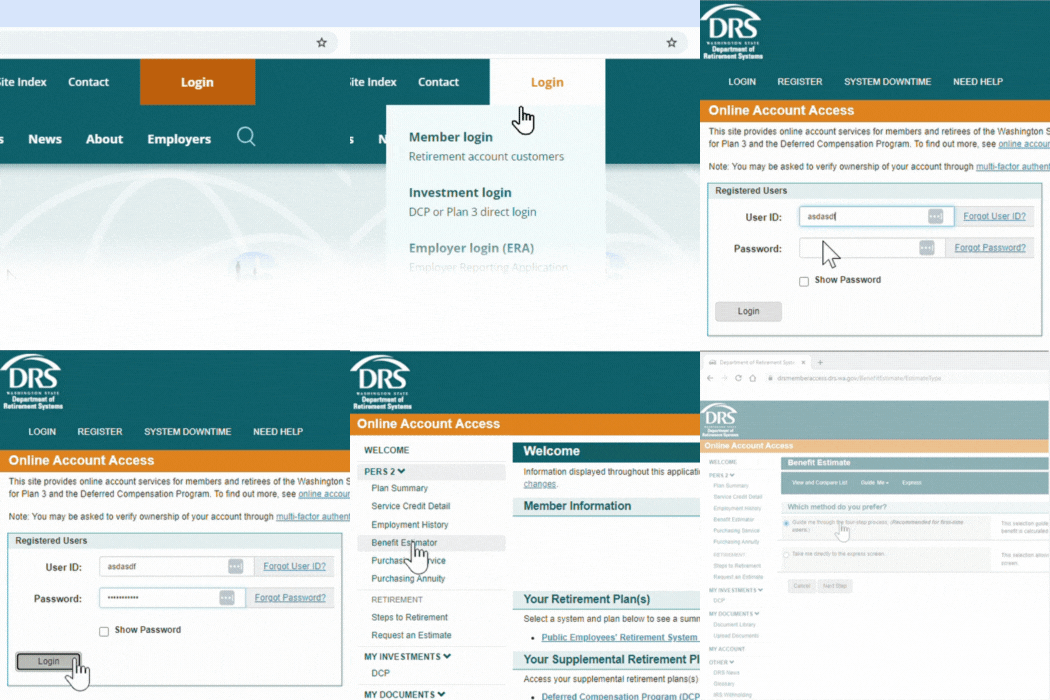
You can use this tool at any point in your career. You can create an estimate using different factors as many times as you like. This calculator will allow you to see a private preview of what your monthly retirement income might look like.
Years of service
Your service credit is the number of years you work in public service. This time is reported by your employer. When you work at least 70 hours in a month, you receive one service credit for the month. You can earn no more than one month of service credit each calendar month, even if more than one employer is reporting hours you work. Review your service credit detail through your online account.
More about service credit.
Your income
The Final Average Salary, or FAS depends on your employment situation before you retire.
- If you held the same position or rank for at least 12 months preceding your retirement, your FAS is the basic salary for that position or rank at the time you retire. (If you previously held a higher ranking position for at least 12 months, contact us.)
- If you didn’t hold the same position or rank for at least 12 months preceding your retirement, your FAS is the monthly average of your highest paid 24 consecutive months within your last 10 years of credited service.
- If you are disabled, your basic monthly salary at the time you retired will be your FAS. Contact your local disability board for more information.
LEOFF Plan 1 formulas
- Between five and ten years of service credit: 1% x service credit x FAS= monthly benefit
- Between 10 and 19 years 11 months of service credit: 1.5% x service credit x FAS= monthly benefit
- 20 or more years of service credit: 2% x service credit x FAS= monthly benefit
Example:
If you retire at age 53 with 20 years of service credit and a monthly Final Average Salary of $8,000, your monthly benefit is $3,200, calculated as follows: 2% x 20 x $8,000 = $3,200
LEOFF benefit enhancement in addition to your monthly benefit
One-time lump-sum benefit
At retirement, LEOFF Plan 1 members are eligible for a one-time lump-sum benefit equal to $100 per service credit month earned, in addition to their monthly benefit.
Example
This calculation shows your lump-sum benefit formula based on 180 service credit months at the time you retire.
180 x $100 = $18,000
If you retire with a line-of-duty disability, you will receive a one-time lump-sum benefit equal to $100 per service credit month or $20,000, whichever is greater. See more details about line-of-duty death benefits.
When can you retire?
Now that we’ve discussed how much money you can get in retirement, let’s talk about when you can retire. You need 5 or more years of service to qualify for a retirement with LEOFF Plan 1. You’re eligible to retire at age 50 if you have at least five years of service credit. Some members are required to retire at age 60.
How do you retire?
When you are within 12 months of retiring, you can start the official retirement process with DRS. First, you request an official benefit estimate. Once you receive the estimate, you complete and submit your application to retire. See this steps to retire with a pension video.
1. Request an official benefit estimate from DRS 3 to 12 months prior to your retirement date. Make this request through your online account or by contacting us. In most cases, we will provide your estimate 5 to 8 weeks before your retirement date. If you haven’t received your requested estimate within 5 weeks of your retirement date, contact us.
Estimates are prioritized by retirement date, which allows DRS to use the most recent information available for you and gives you ample time to submit your retirement application. An official benefit estimate is not the same as the benefit estimator tool available to all customers. To assist your retirement planning any time before or after requesting your official benefit, you can use the benefit estimator tool through your online account.
2. Apply for retirement through your online account. After receiving your official benefit estimate, we recommend completing the application at least 3 to 5 weeks before the date you intend to retire. If you can’t make this timeline, contact us as soon as possible so we can help keep your retirement on track. Members of more than one system will need to complete a paper application.
Estimate your retirement income
You can use the benefit estimator tool in your online account to help plan for retirement at any point—while you are still working, and even after you submit an official request to retire. Log into your online account and select the benefit estimator tool to get started.
When do you get paid?
Your pension money will be direct deposited into your bank account on the last business day of the month, every month, for the rest of your life. The retirement application has a section for your bank information so your funds will be deposited. Once you’ve retired, you can make any updates to your direct deposit through your online account.
Separation vs retirement
You are retired from DRS when you separate from employment and begin collecting your pension. If you leave public employment, but you are not yet collecting a pension, we consider you separated, but not retired. These instructions assume you are separating and will be collecting your pension (retiring).

How can you increase your pension amount?
You can increase your LEOFF Plan 1 pension benefit by increasing your years of service or your income. But when it comes to total retirement income, you have more options.
DCP savings program
Annuity options
What’s an annuity?
The annuities offered by Washington state let you convert your savings into guaranteed monthly income for the rest of your life. When you purchase an annuity, you move your money out of market risk and create a steady, predictable income stream.
Annuities are the only investment withdrawal option that ensures you won’t outlive your account balance. Once your annuity is set up, the income amount and terms cannot be changed or canceled.
DRS administers annuities offered by Washington state with investments provided by the Washington State Investment Board.
Yes. Like your pension, once you start receiving payments, the money will be taxed as ordinary income.
Each year you’ll receive a statement that shows the taxable amount of your annuity. DRS is required to withhold a certain amount of federal taxes.
- Complete a W-4P form for tax withholding.
- If you don’t submit a W-4P, withholding will default to IRS guidelines, (single with no adjustments).
For more details, review IRS Publication 575 or consult a tax advisor. DRS and the record keeper cannot provide tax advice.
The amount depends on the purchase price as well as factors like your age and survivorship option. You can estimate your annuity cost and added monthly income by logging into your online account and selecting Purchasing Service or Purchasing Annuity.
To purchase the Plan and/or Service Credit annuity, select one or both annuities when you retire online. If you complete a paper retirement application, let DRS know you’re considering an annuity. This will allow us to include an annuity estimate along with your retirement estimate.
Compare annuities
Compare annuities
| Feature | Plan annuity | Service credit annuity |
|---|---|---|
| Limits | Minimum purchase: PERS, PSERS, SERS: $5,000 TRS: no min LEOFF, WSPRS: $25,000 No maximum for any plan. | Purchase 1-60 months of service credit |
| Funding source | Purchase with pretax governmental retirement savings (DCP 457, 403b, TSP). TRS also has a cash option. (See Annuity FAQ) | Purchase with cash or pretax savings (DCP 457, 403b, TSP, IRA, 401k). |
| Eligibility | Available at retirement. | Available at retirement. |
| Survivor option | Same as your pension survivor. (WSPRS 1, survivor paid only with Option B.) | Same as your pension survivor. |
| Will I receive a COLA? | COLA up to 3% annually. For TRS or PERS 1 member, COLA is optional at retirement. | COLA up to 3% annually. For TRS or PERS 1 member, COLA is optional at retirement. |
| Continues if returning to work | Yes. | Yes, as long as you follow the hourly limits. |
| Service credit impact | N/A | Increases monthly benefit, but does not change years of service. |
| Timing | Can only purchase when applying for retirement. | Can only purchase when applying for retirement. |
| The amount paid to you | Based on purchase amount from funding source. | Based on same pension formula as retirement benefit. |
| Can be used to qualify for retirement | No. | No. |
| How will I receive this money? | Combined with your pension check. | Combined with your pension check. |
Both annuities use the same calculation factors, so the cost and benefit increase are identical. The main difference lies in the funding sources and payment features. You’re not limited to one annuity, you can purchase both.
If you (and your survivor, if applicable) pass away before the full purchase amount is paid out, your beneficiaries will receive the remaining balance.
The rules for each retirement plan are decided by the Washington state legislature and can vary.
LEOFF plan annuity
When can I purchase?
When you are retiring.
Are there limits to the annuity amount I can purchase?
Minimum: $25,000; There is no maximum.
How much does it cost?
Log in to your account and choose “Purchasing Annuity.” Here you can find the monthly increase to your pension for any purchase amount.
What type of funds can I use to purchase an annuity?
Your payment must come from an eligible governmental plan, like your pretax DCP savings. Members cannot use PERS/SERS/TRS Plan 3 contributions to pay for this annuity.
When does my annuity benefit begin?
Your retirement date or the day after your bill for the annuity is paid in full, whichever comes later.
How often do I receive my annuity benefit?
Monthly.
Can I designate a survivor?
No. Your annuity does not continue to your survivor after your death. This is true even if your survivor is a qualifying spouse who is eligible to receive your retirement benefit.
Will I receive a Cost-of-Living Adjustment (COLA)?
Yes. You will receive a COLA up to 3% annually.
How do I purchase this annuity?
Request this annuity when you retire online. You can also purchase it when completing a paper retirement application.
Can I cancel the annuity if I change my mind?
In most cases, no. Annuities are fixed income sources. Once you purchase the annuity, you will not have access to the funds you used to make the purchase.
There are two exceptions:
If you have not completed the annuity purchase, you can still change or cancel the annuity.
Once you make the purchase, you’ll have 15 days to cancel the transaction. You’ll receive a mailed letter that includes your rescission, or cancel by date.
Will my annuity purchase be refunded when I die?
If you die before the amount of your annuity purchase has been paid back to you, the difference will be refunded to your beneficiary. If thereisn’t any money left from the initial purchase amount, your beneficiary will get a prorated portion of the monthly annuity amount in the month of death. But to be clear, the annuity benefit will not continue to your spouse following your death.
What if I return to work?
Your annuity continues.
Purchase service credit annuity
Purchasing additional service credit increases your monthly retirement benefit for the rest of your life. You can purchase between one and 60 months of service credit in whole months. Purchasing service credit will increase your monthly benefit, but it will not increase the years of service posted on your account. The increase to your benefit is calculated using the same formula as your retirement benefit. This additional service credit is available at the time of your retirement only. Also, you cannot use the additional credit to qualify for retirement (it won’t increase your years of service). If you are including leave cash-outs in your Final Average Salary (FAS) you can choose to have your purchased service credit bill created after these cash-outs have been applied. Both the cost to purchase and the increase to your benefit may be higher if cash-outs are included in the calculation.
When can I purchase?
When you are retiring.
Are there limits to the amount of service credit I can purchase?
Minimum: One month; Maximum: 60 months.
How much does it cost?
Log in to your account and choose “Purchasing Service.” Here you can find the estimated cost and income increase per month you purchase.
What funds can I use to purchase service credit?
You can use any funds except for Plan 3 contributions. Funds rolled over from your DCP account must be pretax.
When does my annuity benefit begin?
After you have made payment in full.
How often do I receive the benefit?
Monthly.
Can I designate a survivor?
Yes. Your survivor will be the same option you chose for your retirement benefit.
Will I receive a Cost-of-Living Adjustment (COLA)?
Yes. You will receive a COLA up to 3% annually. If you’re a TRS Plan 1 or PERS Plan 1 member, a COLA is an optional choice at retirement.
Can I cancel the annuity if I change my mind?
No. Annuities are fixed income sources. Once you purchase the annuity, you will not have access to the funds you used to make the purchase. If you have not completed the annuity purchase, you can still change or cancel the annuity.
How do I purchase service credit?
Request this annuity when you retire online. You can also purchase it when completing a paper retirement application.
Will my annuity purchase be refunded when I die?
Yes. If you (and your survivor if you selected a survivor option) die before the amount of your purchase has been paid back to you, the difference will be refunded to your beneficiary. For TRS Plan 1, this refund does not apply if you selected the Maximum Option.
What if I return to work?
The return to work rules for service credit are the same as your retirement benefit. If you return to work for a DRS-covered employer, your annuity will stop if you return to retirement system membership or if you exceed allowable hours as a retiree (867 per year). If you do not return to a DRS-covered employer, your annuity will continue.
When will my benefit increase be effective?
The increase in your benefit will be effective the day after the department receives your full payment.
See a live or recorded annuity option webinar.
Life events that can affect your pension
If you are a member of LEOFF Plan 1 and you become disabled, you may be entitled to disability benefits. Please contact DRS to discuss those benefits.
Separating
If you separate from LEOFF employment, you can either withdraw your funds, retire if you meet eligibility requirements or leave your funds in the plan if you are vested for a future retirement. You can also leave your funds in the account if you have a balance of more than $1,000. If you are inactive and non-vested with a balance of less than $1,000, DRS is required to close your account and return the funds to you. The IRS requires you to start receiving your monthly benefit by age 73, unless you are still employed.
Separating from LEOFF-covered employment is the only circumstance where you can withdraw your contributions. Doing so cancels any rights and benefit you have accrued in LEOFF. You can restore your contributions and re-establish your benefit only in certain circumstances.
There are tax implications to withdrawing your contributions, so you might want to contact the IRS or a tax advisor before making a decision.
Be sure to keep us up to date on any changes to your name, address or beneficiary. It’s important that you keep your beneficiary designation current, because a divorce, marriage or other circumstance might invalidate it.
Service credit is cumulative
The service credit you earn toward vesting is cumulative. This means if you separate but later return to public service, you can continue to earn service credit toward your vested status even if you didn’t yet qualify when you separated. For Plan 1 and Plan 2 members, withdrawing your contributions when you separate will set your service credit years to 0.

Retirement Date – the first day of the month AFTER your separation date and you’ve applied to retire.
Withdrawals
For information about withdrawing your retirement contributions before retirement, see Withdrawal of Retirement Contributions.
Loans and borrowing
Due to Internal Revenue Service regulations regarding government pension plans, none of the state retirement pension plans allow for loans or borrowing from your contributions. Retirement plan members, you can only access the funds you’ve contributed if you have separated employment from a DRS-covered employer.
The Washington Deferred Compensation Program (DCP) does not allow loans. If you have a DCP account, an Unforeseeable Emergency Withdrawal may be possible under certain criteria. More about DCP emergency withdrawals.
If you need to show proof of your account balance or monthly pension payment to secure a home loan, mortgage or other borrowing, log in to your DRS online account to view, print or download an account balance or pension verification letter.
Returning
If you leave your position, withdraw your contributions and later return to work covered by LEOFF, you might be able to restore your previous service credit. To do so, you must repay the total amount of the contributions you withdrew plus interest within five years of returning to work or before you retire, whichever comes first. Contact us to find out that amount.
A dual member, or someone who belongs to more than one retirement system, might be able to restore service credit earned in a retirement system other than LEOFF. Each time you become a dual member, you’ll have 24 months to restore service credit earned in a previous retirement system.
It might still be possible to purchase service credit after the deadline has passed. However, the cost in that case is considerably higher.
Retired? See working after retirement.
Service credit is the time used to calculate your pension retirement income. Sometimes customers notice their service credit doesn’t match their seniority date—these times do not always match. Often, the difference is because of missing or withdrawn service credit. You may be eligible to purchase some or all of the missing credit. Here is what you need to know about the process.
How do I check my service credit?
View your complete service credit history through your online account. It is a good practice to check your service credit every few years to be sure it matches your expectations.
Contact DRS for a cost estimate
You will need to contact DRS to request a cost for restoring your credit. We are not able to provide an estimate when you call. Similar to a retirement benefit estimate, this cost must be calculated by DRS and may require information from your employer.
You’ll need this information
The following preparation can expedite your request:
Provide the dates for the missing service. Find your service credit history in your online account.
Let us know if there is a gap in your service credit or if you withdrew from your account.
- If there is a gap in your service credit, do you know why? Were there any special circumstances around your employment at the time? Some common events for missing credit include: authorized leave of absence, childbirth, substitute teaching, temporary duty disability, or injury.
- If you withdrew from your account, when did you pull out the contributions?
How do I pay?
Make direct payment with either a personal or cashier’s check. Or in many cases it’s also possible to transfer funds from another eligible retirement account to purchase service credit. However, DRS cannot accept funds in excess of the cost to make your purchase. Check with your account administrator to see if you can transfer those dollars to a 401(a) account type.
There is a deadline
You must request and purchase the missing service within the timeframe allowed for your plan. The amount of time varies by the reason for the missing credit. Ask DRS about your options for purchase. If the deadline has passed, you may still have the option to purchase additional service credit as an annuity option when you retire. This purchase will not restore missing time, but it would be used in your retirement payment calculation.
How will your retirement income be affected if you return to work?
It depends on where you work.
If you return to work in another WSPRS or LEOFF position, your benefit will stop and you will re-enter membership.
If you return to work in another DRS-covered retirement plan (like PSERS, PERS, SERS or TRS), you will continue to receive your retirement benefit regardless of how many hours you work.
Working for a non-DRS covered employer
Unless you’ve been approved for a disability retirement, you can return to work for an employer not covered by a Washington state retirement system without affecting your monthly benefit.
If you are a member of more than one Washington state retirement system, you are a dual member. You can combine service credit earned in all dual member systems to become eligible for retirement.
In most cases, your monthly benefit will be based on the highest base salary you earned, regardless of which system you earned it in.
Base salary includes your wages and overtime and can include other cash payments if those payments are included as base salary in all the retirement systems you are retiring from.
See the multiple plans page for more information about dual membership.
See a live or recorded membership in multiple plans webinar.
Military service
Marriage or divorce
Your retirement account can be affected by changes in your marital status. If you marry or divorce before you retire, you need to update your beneficiary, even if your beneficiary remains the same.
For further research on property orders, see WAC 415-02-500.
IRS federal taxes or limits on your benefit
Federal taxes on your benefit
Most, if not all, of your benefit will be subject to federal income tax. The only exception will be any portion that was taxed before it was contributed. When you retire, we will let you know if any portion of your contributions has already been taxed.
Since most public employers deduct contributions before taxes, it’s likely your entire retirement benefit will be taxable.
At retirement, you must complete and submit an IRS W-4P form to let us know how much of your benefit should be withheld for taxes. If you don’t, DRS is required to withhold federal taxes as if you are single with no adjustments. To adjust your IRS tax withholding amount after retirement, log in to your online account or mail a new W-4P form to DRS.
For each tax year you receive a retirement benefit, we will provide you with a 1099-R form to use in preparing your tax return (see 1099-R). These forms are usually mailed at the end of January for the previous year. The information is also available through your online account.
It is your responsibility to declare the proper amount of taxable income on your income tax return.
If you opt to deduct health care from your monthly pension payments in retirement:
The IRS considers health insurance premiums paid via your monthly pension as part of your taxable income. This is because your pension contributions were not taxed (see IRS page 8). Visit the retired member page for more information about deductions in retirement.
Federal benefit limits for high income members
If you are a highly paid member or retiree, you may encounter a federal limit on your retirement benefit. There are two federal regulations that could limit benefits for highly paid members and retirees. The salary limit (which restricts the salary used to determine your benefit) and the benefit limit (which limits the annual benefit amount you can receive). In other words, federal law limits the amount of compensation you can pay retirement system contributions on, and that can be used in your benefit calculations. The IRS can adjust the amount each year.
2026 salary limit
The 2026 limit is $360,000. This means any salary you earn over this amount in 2026 will not be part of your retirement contributions or your pension calculation. See the following section for more information on how this limit applies to you.
Internal Revenue Salary Limit for Active Members
If you began public service before 1/1/96
- You don’t have a salary limit
- You pay contributions on all salary earned
- DRS does not adjust your Average Final Compensation for limit testing purposes
- Your pension calculation is not affected by salary limits
- IRC section 415(b) requires that your annual benefit must not exceed the limit. If you don’t exceed the benefit limit at the time you retire, it is still possible that your benefit may be affected at a later date.
If you began public service on or after 1/1/96
- The current year salary limit applies (see above)
- The salary limit is the same for all members and is adjusted annually by the IRS
- If you reach the salary limit in a calendar year, you stop paying contributions
- DRS notifies your employer when you approach the salary limit
- Your Annual Final Compensation is capped for limit testing purposes if it includes the years you exceeded the salary limit
- Your pension calculation is affected by salary limits
How do survivors or beneficiaries impact the limit?
Does my benefit amount change for my survivor beneficiary after I die?
No. If you chose to provide for a survivor beneficiary, and you die before your survivor does, your benefit transitions to your survivor at the rate you chose (100%, 50% or 67%). After the transition, your survivor’s benefit will also be tested.
What happens if my survivor beneficiary dies before I do?
If your survivor beneficiary dies before you do, your benefit increases as if you hadn’t chosen a survivor option. If your survivor beneficiary was your spouse or domestic partner, we will continue to use your original benefit amount in your annual testing. If your survivor beneficiary was not your spouse or domestic partner, we will use your new, higher limit amount in your annual testing.
More information about federal limits
The IRS characterizes the retirement systems as 401(a) defined benefit plans. To retain status as qualified plans, the systems must comply with federal regulations. For more information about salary limit regulations, see Internal Revenue Code (IRC) Section 401(a)(17). For more about benefit limit regulations, see IRC 415(b).
For more information see these IRS resources:
More about LEOFF Plan 1
Selecting a beneficiary
Why beneficiaries matter
Naming a beneficiary protects your loved ones and ensures your benefits go to the people you choose. Your beneficiary is the person (or people) who would receive any remaining funds in your retirement account after your death.
If you don’t name a beneficiary, any benefits due will be paid to your surviving spouse or minor child. If you don’t have a surviving spouse or minor child, the funds will be paid to your estate.
Keeping your beneficiary information current helps avoid delays or complications later. About one-third of DRS customers don’t have a beneficiary on file. Log into your account to make sure you’re not one of them.
When to review or update your beneficiaries
You can change your beneficiaries at any time, and you should review your selections regularly, especially after a major life event, such as:
- Marriage or state-registered domestic partnership
- Divorce or legal separation
- Birth or adoption of a child
- Death of a previously named beneficiary
Life events like these may invalidate your previous choices, so it’s important to keep your designations up to date.
How to add or update your beneficiaries
- Before retirement: Log in to your online account and select My Account to view or update your beneficiaries for your pension and Deferred Compensation Program (DCP) accounts. Or you can contact us to request a mailed form.
- After retirement: Retired members contact us to request a mailed beneficiary designation form. Due to the complexity of survivor options, pension beneficiaries cannot be changed online. However, you can update DCP beneficiaries anytime through your online account.
Beneficiaries versus survivors
It’s common to mix up these two terms. Here’s how they differ:
- Beneficiary: A person or organization you designate to receive a one-time, lump-sum payment of any remaining account balance after your death. You can name multiple beneficiaries.
- Survivor: A person (usually a spouse or partner) you can name at retirement to receive lifetime monthly benefit payments after your death. You can only name one survivor, and this choice is usually permanent. Visit the survivor section of this page for more information.
If you have both, the survivor receives payments first. Beneficiaries are paid only if the survivor also dies and funds remain in your account.
What happens if you don’t name a beneficiary
If you pass away without a named beneficiary:
- Any benefits due will first go to your surviving spouse or minor child.
- If you don’t have a surviving spouse or minor child, the benefit will be paid to your estate.
Without a named beneficiary, payments can be delayed, so it’s important to make your designations now.
What if you pass away before you retire?
If you pass before separating from your Washington public service position, your contribution balance plus interest will be paid out to your beneficiaries.
However, your surviving spouse or partner could have the option to inherit your account as pension payments. This option is available if you worked at least ten years in Plan 1 or Plan 2, or reached vested status in Plan 3. Contact DRS for information about eligibility and retirement timing.
Next steps
- Log in to your online account to view or update your beneficiary information.
- Or contact us to request a mailed form if you’re retired or prefer to update by mail.
- Stay informed by reviewing survivor options in the next section.
Keeping your beneficiary information current is a simple but powerful way to protect the people you care about.
Special note for Plan 3 members
At retirement, you may select:
- A survivor for your pension benefit; and
- One or more beneficiaries for your investment account (these can be the same or different people as your pension selections).
If you use your investment account to purchase a TAP Annuity, you’ll also have the option to name a survivor for that annuity.

Your survivor benefit options
Survivor benefits
After your death, your eligible surviving spouse will continue to receive the amount you were receiving at the time of your death. The amount of your spouse’s benefit could increase by 5% of your FAS for each eligible child, to a maximum of 60% of your FAS.
Survivor eligibility
To be eligible for a survivor benefit, your spouse or partner must have been married to you or in a registered domestic partnership with you:
- At the time of your death in service
- For at least one year before your service or disability retirement
- For at least one year before you separated from service with at least 20 years of service credit
Other circumstances could exist that would cause a spouse or registered domestic partner to become eligible for a survivor benefit.
Rollovers
What is a rollover? A rollover is moving funds from one eligible retirement plan to another. Rollovers can include a rollover out (moving funds out of an account) and a rollover in (moving money into an account).
You can roll out your pension account contributions, DCP and Plan 3 investment balances at any time once you separate from service. Pension plan contributions made by your employer are not eligible for rollovers. These dollars remain in the pension trust fund and are only available to you as part of a monthly pension retirement income.
While DRS doesn’t charge fees for rollover services, your other financial institutions could. Make sure you’re aware of any fees or differences in expenses, options and services before you move your funds. We recommend initiating your withdrawal/rollover promptly because your institution’s withdrawal timelines can take weeks or months. If DRS doesn’t receive your funds by the bill due date, your rollover will not be accepted.
Converting a cash withdrawal to a rollover
If you make a cash withdrawal, you’ll have 60 days from the date you receive payment to deposit the funds into a traditional IRA or another eligible plan that accepts rollovers. Your rollover in amount must match the rollover out amount before taxes or the difference is subject to income tax. You may choose to pay the difference out of pocket when you roll it over. This difference could be recovered when you file your annual tax return with the IRS. Consult your tax advisor or visit this IRS page to find out more.
Rolling funds out
Your account contributions and interest can be rolled out once you separate from service. Complete the withdrawal process for your plan. It is your responsibility to confirm whether your chosen institution will accept rollover funds.
When considering whether to roll your contributions out of your plan, find out how much service credit you’ve earned. If you have at least five years, you qualify for a guaranteed monthly pension in retirement. Retiring with the pension is the only way to receive the contributions your employer has also been adding to your plan. Plan 1 members who withdraw or rollover their contributions will forfeit their pension.
You can begin the rollover process by completing the Plan 1 and Plan 2 Pension Withdrawal form.
Rolling funds in
Generally speaking, you cannot roll funds into your retirement benefit account. However, there are some unique circumstances which would allow you to do so. For example, you can roll funds in to purchase service credit or an annuity. Using rollover funds to make these purchases would be reported as a rollover for tax purposes. If you have service credit available to recover or purchase, contact DRS to find out more about your options.
Washington’s Deferred Compensation Program (DCP) does accept rollovers-in. More about rolling funds into DCP.
Health insurance options
Ask your employer if you will be eligible for health insurance coverage.
Visit the health care page for more resources.
Plan eligibility
You are eligible for LEOFF Plan 1 membership if you were hired before Oct. 1, 1977, as a fulltime, fully compensated commissioned law enforcement officer or firefighter.
On or after July 1, 2024, ‘law enforcement officer’ includes any person who is commissioned and employed on a less than full-time, fully compensated basis to enforce the criminal laws of the state of Washington.
Law enforcement officers: A law enforcement officer is someone who works for a LEOFF employer and is commissioned and empowered to enforce the laws of the state of Washington. These positions include:
- County and deputy sheriffs
- Police chiefs
- City police officers (if appointed to offices, positions or ranks that a city charter provision or ordinance specifically designates)
- Town marshals and deputy marshals
- Directors of public safety and public safety officers (if employed by cities or towns whose populations are smaller than 10,000)
The following positions are excluded from LEOFF membership:
- Noncommissioned people in positions that are primarily clerical or secretarial
- Deputy sheriffs who have not passed a civil service exam
- Directors of public safety or public safety officers in cities or towns whose populations are smaller than 10,000, if they were receiving a LEOFF retirement allowance on July 25, 1993
Firefighters: A firefighter is someone who has the legal authority and primary responsibility to direct or perform fire protection activities (that is, preventing, controlling and extinguishing fires). Secondary fire protection activities might include incidental functions, such as housekeeping, equipment maintenance, grounds maintenance, fire safety inspections, lecturing, performing community fire drills, and inspecting homes and schools for fire hazards. Supervisory firefighter personnel meet the criteria of a firefighter.
The following positions are excluded from LEOFF membership:
- Firefighters who have not completed a civil service exam (if the employer requires it)
- Volunteer or resident volunteer firefighters
If you were first hired as a law enforcement officer or firefighter after Aug. 1, 1971, you were required to meet minimum medical and health standards to join the retirement plan.
If you separate from LEOFF-covered service, you’ll be required to meet these standards again to be eligible for Plan 1 membership. You’ll also be required to meet certain age requirements as well. If you are found to be ineligible, you will need to become a member of LEOFF Plan 2 instead. Some exceptions do apply. Contact DRS to find out more.
LEOFF 1 resources
Cost of living adjustment (COLA)
Your feedback
Please share your experience visiting this website.
Your feedback helps us improve content and navigation. Please don’t include personal information, like your Social Security number. We can’t respond to individual questions here. For account help, contact DRS directly.