PSERS Plan 2
Public Safety Employees’ Retirement System (PSERS) Plan 2 is a 401(a) lifetime retirement pension plan available to public safety employees in Washington. You and your employer contribute a percentage of income to fund the plan.
Your contributions
PSERS Plan 2 employee contribution rate: 6.91%
This is the percentage of your salary that goes toward your pension retirement income. More about contributions.
View Essentials of PSERS Plan 2 video.
How much will your pension be?
Estimate your retirement benefit in minutes using the personalized Benefit Estimator in your online account. Your total pension amount is based on your years of service and your income. See more about how we calculate your benefit.
How to estimate your benefit
-
- From the DRS homepage, select the Member Login button in the top right.
- Log in to your online account.
- In the menu bar, select your plan name – such as PERS 2. This will open a dropdown menu.
- Select Benefit Estimator.
- Read how to use the estimator and select Accept & Continue.
- For first-time users, we recommend using the four-step process. This helps you learn how your benefit is calculated.
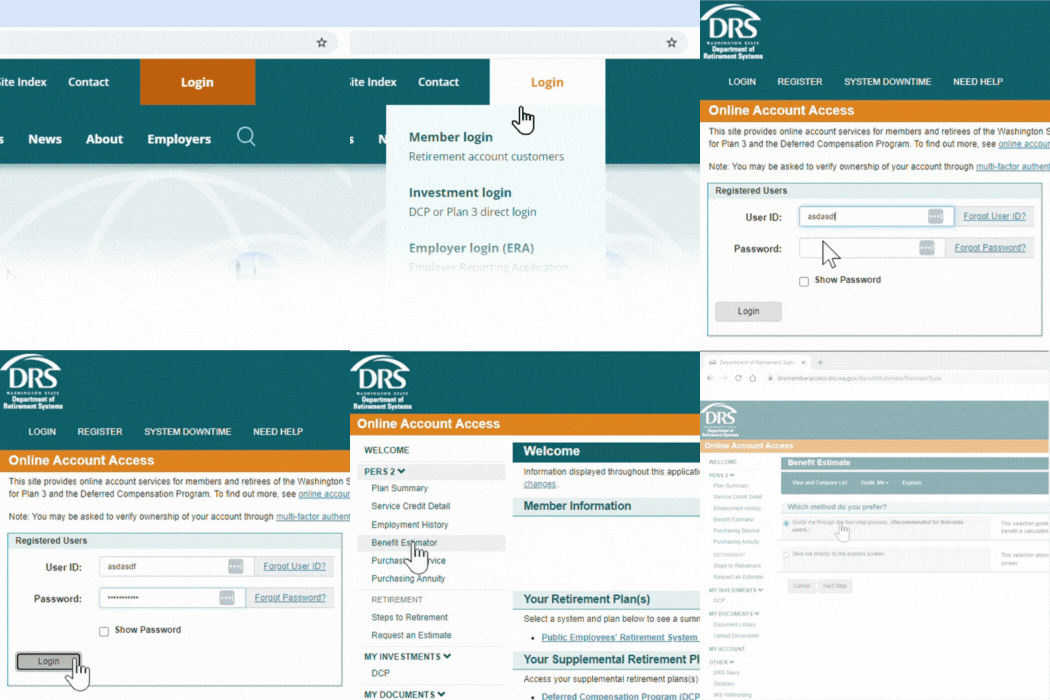
You can use this tool at any point in your career. You can create an estimate using different factors as many times as you like. This calculator will allow you to see a private preview of what your monthly retirement income might look like.
Years of service
Your service credit is the number of years you work in public service. This time is reported by your employer. When you work at least 90 hours in a month, you receive one service credit for the month. You can earn no more than one month of service credit each calendar month, even if more than one employer is reporting hours you work. If you work fewer than 90 hours in any month, you’ll receive partial credit for the month (70 to 90 hours gives you 0.5 credits and 70 or fewer hours will be 0.25 credits). Review your service credit detail through your online account.
More about service credit.
Your income
The Average Final Compensation, or AFC is the average of your 60 consecutive highest earning months in your career. This could be at the beginning, middle or end of your career. DRS uses your AFC income information to calculate your pension amount. For high income public employees, federal law limits the amount you can contribute toward retirement and limits the benefit calculation. See IRS limits.
PSERS Plan 2 formula
2% x service credit years x Average Final Compensation = monthly benefit
Example
Let’s say you work 23 years and the average of your highest 60 consecutive months of income (AFC) is $5,400 per month.
2% x 23 years x $5,400 = $2,484
When you retire, you’d receive $2,484 per month.
When can you retire?
Now that we’ve discussed how much money you can get in retirement, let’s talk about when you can retire. You need 5 or more years of service to qualify for a retirement with PSERS Plan 2. Full retirement age is 65. You can also choose to retire as early as age 53, but your benefit could be reduced depending on your total years of service.
You need 5 years of service
With PSERS Plan 2, you need five years of service to qualify for a retirement. Once you have five years, you are a “vested” member. Five is the minimum, but you can earn an unlimited number of years to increase your pension amount.
Full retirement
You are eligible to retire at age 65 if you have at least five years of service credit. You are eligible to retire at age 60 if you have at least 10 years of PSERS service credit.
Early retirement
Any retirement before age 60 is an early retirement. At age 53 with at least 20 service credit years, you’re eligible to retire and receive a retirement allowance. If you retire early, your benefit will be reduced to reflect that you will be receiving it over a longer period of time. Your benefit depends on how much service credit you have earned and your age.
Reduced benefit
| Age | 3% Reduction Factor |
|---|---|
| 53 | 79% |
| 54 | 82% |
| 55 | 85% |
| 56 | 88% |
| 57 | 91% |
| 58 | 94% |
| 59 | 97% |
| 60 | 100% |
Early Retirement Factors
View the early retirement administrative factors for your plan. The factors are subject to change based on State Actuary figures.
Public safety officers’ tax savings on health insurance premiums
If you retire as a public safety officer from a designated Washington state retirement system, the federal Pension Protection Act of 2006 (PPA) might benefit you. It allows you to exclude up to $3,000 of your qualified health, accident and long-term care insurance premiums from your gross taxable income each year as long as the premiums are also deducted from your retirement benefit. If you retire early, you don’t qualify unless you receive a disability retirement.
How do you retire?
When you are within 12 months of retiring, you can start the official retirement process with DRS. First, you request an official benefit estimate. Once you receive the estimate, you complete and submit your application to retire. See this steps to retire with a pension video.
1. Request an official benefit estimate from DRS 3 to 12 months prior to your retirement date. Make this request through your online account or by contacting us. In most cases, we will provide your estimate 5 to 8 weeks before your retirement date. If you haven’t received your requested estimate within 5 weeks of your retirement date, contact us.
Estimates are prioritized by retirement date, which allows DRS to use the most recent information available for you and gives you ample time to submit your retirement application. An official benefit estimate is not the same as the benefit estimator tool available to all customers. To assist your retirement planning any time before or after requesting your official benefit, you can use the benefit estimator tool through your online account.
2. Apply for retirement through your online account. After receiving your official benefit estimate, we recommend completing the application at least 3 to 5 weeks before the date you intend to retire. If you can’t make this timeline, contact us as soon as possible so we can help keep your retirement on track. Members of more than one system will need to complete a paper application.
Estimate your retirement income
You can use the benefit estimator tool in your online account to help plan for retirement at any point—while you are still working, and even after you submit an official request to retire. Log into your online account and select the benefit estimator tool to get started.
When do you get paid?
Your pension money will be direct deposited into your bank account on the last business day of the month, every month, for the rest of your life. The retirement application has a section for your bank information so your funds will be deposited. Once you’ve retired, you can make any updates to your direct deposit through your online account.
Separation vs retirement
You are retired from DRS when you separate from employment and begin collecting your pension. If you leave public employment, but you are not yet collecting a pension, we consider you separated, but not retired. These instructions assume you are separating and will be collecting your pension (retiring).

See live or recorded retirement planning webinars.
How can you increase your pension amount?
You can increase your pension benefit by increasing your years of service or your income. But when it comes to total retirement income, you have more options.
DCP savings program
Annuity options
What’s an annuity?
The annuities offered by Washington state let you convert your savings into guaranteed monthly income for the rest of your life. When you purchase an annuity, you move your money out of market risk and create a steady, predictable income stream.
Annuities are the only investment withdrawal option that ensures you won’t outlive your account balance. Once your annuity is set up, the income amount and terms cannot be changed or canceled.
DRS administers annuities offered by Washington state with investments provided by the Washington State Investment Board.
Yes. Like your pension, once you start receiving payments, the money will be taxed as ordinary income.
Each year you’ll receive a statement that shows the taxable amount of your annuity. DRS is required to withhold a certain amount of federal taxes.
- Complete a W-4P form for tax withholding.
- If you don’t submit a W-4P, withholding will default to IRS guidelines, (single with no adjustments).
For more details, review IRS Publication 575 or consult a tax advisor. DRS and the record keeper cannot provide tax advice.
The amount depends on the purchase price as well as factors like your age and survivorship option. You can estimate your annuity cost and added monthly income by logging into your online account and selecting Purchasing Service or Purchasing Annuity.
To purchase the Plan and/or Service Credit annuity, select one or both annuities when you retire online. If you complete a paper retirement application, let DRS know you’re considering an annuity. This will allow us to include an annuity estimate along with your retirement estimate.
Compare annuities
Compare annuities
| Feature | Plan annuity | Service credit annuity |
|---|---|---|
| Limits | Minimum purchase: PERS, PSERS, SERS: $5,000 TRS: no min LEOFF, WSPRS: $25,000 No maximum for any plan. | Purchase 1-60 months of service credit |
| Funding source | Purchase with pretax governmental retirement savings (DCP 457, 403b, TSP). TRS also has a cash option. (See Annuity FAQ) | Purchase with cash or pretax savings (DCP 457, 403b, TSP, IRA, 401k). |
| Eligibility | Available at retirement. | Available at retirement. |
| Survivor option | Same as your pension survivor. (WSPRS 1, survivor paid only with Option B.) | Same as your pension survivor. |
| Will I receive a COLA? | COLA up to 3% annually. For TRS or PERS 1 member, COLA is optional at retirement. | COLA up to 3% annually. For TRS or PERS 1 member, COLA is optional at retirement. |
| Continues if returning to work | Yes. | Yes, as long as you follow the hourly limits. |
| Service credit impact | N/A | Increases monthly benefit, but does not change years of service. |
| Timing | Can only purchase when applying for retirement. | Can only purchase when applying for retirement. |
| The amount paid to you | Based on purchase amount from funding source. | Based on same pension formula as retirement benefit. |
| Can be used to qualify for retirement | No. | No. |
| How will I receive this money? | Combined with your pension check. | Combined with your pension check. |
Both annuities use the same calculation factors, so the cost and benefit increase are identical. The main difference lies in the funding sources and payment features. You’re not limited to one annuity, you can purchase both.
If you (and your survivor, if applicable) pass away before the full purchase amount is paid out, your beneficiaries will receive the remaining balance.
The rules for each retirement plan are decided by the Washington state legislature and can vary.
PSERS plan annuity
When can I purchase?
When you are retiring.
Are there limits to the annuity amount I can purchase?
Yes, the minimum purchase amount is $5,000. There are no maximum limits.
How much does it cost?
Log in to your account and choose “Purchasing Annuity.” Here you can find the monthly increase to your pension for any purchase amount.
What funds can I use to purchase an annuity?
Your payment must come from an eligible governmental plan, like your pretax DCP savings. Members cannot use PERS/SERS/TRS Plan 3 contributions to pay for this annuity.
When does my annuity benefit begin?
Your retirement date or the day after your bill for the annuity is paid in full, whichever comes later.
How often do I receive my annuity benefit?
Monthly.
Can I designate a survivor?
Yes. Your survivor must be the same survivor and survivor option you chose for your retirement benefit.
Will I receive a Cost-of-Living Adjustment (COLA)?
Yes. You will receive a COLA up to 3% annually. If you’re a Plan 1 member, a COLA is optional at retirement and your choice will also apply to this annuity purchase.
How do I purchase this annuity?
Request this annuity when you retire online. You can also purchase it when completing a paper retirement application.
Can I cancel the annuity if I change my mind?
In most cases, no. Annuities are fixed income sources. Once you purchase the annuity, you will not have access to the funds you used to make the purchase.
There are two exceptions:
If you have not completed the annuity purchase, you can still change or cancel the annuity.
Once you make the purchase, you’ll have 15 days to cancel the transaction. You’ll receive a mailed contract that includes your rescission, or cancel by date.
Will my annuity purchase be refunded if I die?
If you (and your survivor if you selected a survivor option) die before the amount of your annuity purchase has been paid back to you, the difference will be refunded to your beneficiary.
What if I return to work?
Your annuity continues.
Purchase service credit annuity
Purchasing additional service credit increases your monthly retirement benefit for the rest of your life. You can purchase between one and 60 months of service credit in whole months. Purchasing service credit will increase your monthly benefit, but it will not increase the years of service posted on your account. The increase to your benefit is calculated using the same formula as your retirement benefit. This additional service credit is available at the time of your retirement only. Also, you cannot use the additional credit to qualify for retirement (it won’t increase your years of service).
When can I purchase?
When you are retiring.
Are there limits to the amount of service credit I can purchase?
Minimum: One month; Maximum: 60 months.
How much does it cost?
Log in to your account and choose “Purchasing Service.” Here you can find the estimated cost and income increase per month you purchase.
What funds can I use to purchase service credit?
You can use any funds except for Plan 3 contributions. Funds rolled over from your DCP account must be pretax.
When does my annuity benefit begin?
After you have made payment in full.
How often do I receive the benefit?
Monthly.
Can I designate a survivor?
Yes. Your survivor will be the same option you chose for your retirement benefit.
Will I receive a Cost-of-Living Adjustment (COLA)?
Yes. You will receive a COLA up to 3% annually. If you’re a TRS Plan 1 or PERS Plan 1 member, a COLA is an optional choice at retirement.
Can I cancel the annuity if I change my mind?
No. Annuities are fixed income sources. Once you purchase the annuity, you will not have access to the funds you used to make the purchase. If you have not completed the annuity purchase, you can still change or cancel the annuity.
How do I purchase service credit?
Request this annuity when you retire online. You can also purchase it when completing a paper retirement application.
Will my annuity purchase be refunded when I die?
Yes. If you (and your survivor if you selected a survivor option) die before the amount of your purchase has been paid back to you, the difference will be refunded to your beneficiary. For TRS Plan 1, this refund does not apply if you selected the Maximum Option.
What if I return to work?
The return to work rules for service credit are the same as your retirement benefit. If you return to work for a DRS-covered employer, your annuity will stop if you return to retirement system membership or if you exceed allowable hours as a retiree (867 per year). If you do not return to a DRS-covered employer, your annuity will continue.
When will my benefit increase be effective?
The increase in your benefit will be effective the day after the department receives your full payment.
See a live or recorded annuity option webinar.
Life events that can affect your pension
Death of a retired member
Please contact DRS as soon as possible. If the retiree chose a survivor benefit, we must update the account for payments to continue. If the retiree did not select a survivor option, we need to stop monthly benefits to avoid an overpayment.
When you contact us, please be ready to provide the deceased retiree’s:
- Full name
- Social Security number
- Date of death
We’ll also ask who is handling the affairs for the estate.
Report a death to DRS
Online: Report the death online.
Phone: 360-664-7081, Option 1
Email: drs.moddnd@drs.wa.gov – Please provide only the last 4 digits of the deceased’s SSN
Mailed form: Print and mail this death reporting form to DRS.
Death of an active or not yet retired member
If a member passes before separating from their Washington public service position, their contribution balance plus interest will be paid out to their beneficiaries.
However, if they worked for at least ten years, a surviving spouse or partner could have the option to inherit the account as pension payments. This option is available if the member worked at least ten years (or reached vested status in Plan 3). Contact DRS for information about eligibility and retirement timing.
When you contact us, please be ready to provide the deceased member’s full name, Social Security number and date of death. Also tell us if the death may be work-related.
Death of a beneficiary or survivor
If you are an active member, you can update your beneficiary designation at any time by logging into your online account.
If your named survivor dies after you retire, you can have your pension benefit changed to the single-life option with no survivor reduction. You will need to report the death to DRS. This provision applies to all DRS plans except for LEOFF and WSPRS Plan 1.
More resources
Information for beneficiaries, claimants and survivors
Death & Disability Benefits Webinars (PERS SERS TRS & LEOFF 2)
If you are a PSERS Plan 2 member and you become disabled, you might be entitled to a disability benefit. The Department of Retirement Systems (DRS) recommends you contact a Retirement Specialist if you plan to apply for a disability retirement.
Do you already qualify for retirement?
For most people, if you are vested in PSERS and qualify to retire, there is no financial benefit to taking an earned disability vs a service retirement, even for early retirement. The income you receive for either retirement uses the same calculations. The only time this may not be true is if you qualify for a PSERS catastrophic duty disability benefit. An early or a full service retirement is also a much faster process than a disability retirement.
If I am not eligible for a service retirement, am I eligible for a disability retirement benefit?
If you are totally incapacitated for continued employment with your PSERS employer and you leave that employment as a result of your disability, you might be eligible for a disability retirement benefit.
You do not need a minimum amount of service credit to be eligible for a disability benefit. You must file an application with DRS before you can qualify for a disability benefit. DRS will determine whether you are capable of carrying out the duties of the job you performed at the time of the disability or any other PSERS-eligible employment you are qualified to perform. DRS will also determine whether your disability occurred in the line of duty. You are responsible for scheduling and paying for independent medical examinations to prove you qualify for a disability retirement.
What are the types of disability benefits?
There are two types of disability retirement benefits:
- PSERS earned disability benefit
- PSERS catastrophic duty disability benefit
PSERS earned disability benefit
The PSERS earned disability benefit is calculated as follows:
2% x AFC x service credit years
Average Final Compensation (AFC) is the monthly average of your 60 consecutive, highest-paid service credit months. If you have at least 10 service credit years in PSERS, your monthly benefit will be permanently actuarially reduced to reflect the difference in the number of years between your age when you separated for a disability and age 60.
If you have less than 10 service credit years in PSERS, your monthly benefit will be permanently actuarially reduced to reflect the difference in the number of years between your age when you separated for a disability and age 65.
PSERS catastrophic duty disability benefit
If your disability occurred in the line of duty and is so severe it prevents you from performing substantial gainful activity, you might be entitled to receive a PSERS catastrophic duty disability benefit.
DRS will calculate the PSERS catastrophic duty disability benefit in one of three ways:
- 70% of your AFC
- 100% of your AFC, offset by Social Security Disability Insurance (SSDI) and workers’ compensation disability payments, or
- 2% x AFC x service credit years
You will receive the highest resulting benefit. However, the combined benefit from SSDI and workers’ compensation cannot exceed 100% of your AFC.
How do I apply?
Call DRS and request an official estimate. It takes about 3-4 weeks for DRS to calculate your benefit. Then we will mail you a packet with the estimate and a three-part form. The application consists of three parts:
- Your portion
- Your employer’s portions
- Your doctor’s portions that they complete, as well as supporting medical information
To start the process, DRS must receive a complete and accurate application and adequate medical information.
You may apply before separating from employment. If you have already separated, you may still apply. However, your eligibility for a benefit will be based on your condition at the time of separation from employment.
If you have not separated from employment within 90 days of your approval date, DRS will rescind its approval. If that happens, you must reapply and submit current medical evidence to be considered for a disability benefit.
Your retirement date for the PSERS earned disability benefit is the first of the month following your separation date. For example, if your application is approved May 4, and you separate from service May 15, your retirement date is June 1, and you will receive your first monthly benefit on the last working day of June.
If you applied for a PSERS catastrophic duty disability benefit, the effective date will be the first day of the month following medical or vocational records that support total incapacitation for any employment.
How long will it take for a disability determination to be made?
The entire application process averages four to five months from the time you request the estimate, but the timing can vary. To get a disability determination as soon as possible, return all supporting documentation with your completed and signed application.
It usually takes about four to six weeks to determine your eligibility after receiving a complete and accurate application and supporting medical documentation.
Could I be eligible for other disability benefits outside DRS?
You might also be eligible for disability-related benefits from the Department of Labor & Industries (workers’ compensation benefits), Department of Social and Health Services, the Social Security Administration, your employer and disability insurers.
For a PSERS catastrophic duty disability benefit, the additional benefits you may receive from the Social Security Administration, Department of Labor & Industries, or other disability insurers, could affect your DRS benefit amount.
Any benefits you receive from DRS could also affect benefits you receive from other organizations. Contact those organizations to find out how you may be affected.
Can my monthly benefit increase after I retire?
On July 1 of every year following your first full year of retirement, your monthly benefit will be adjusted by the percentage change in the Consumer Price Index to a maximum of 3% per year.
Can I lose my benefit?
If you are receiving a monthly disability benefit, DRS might require you to undergo comprehensive medical examinations at DRS’ expense. You or your doctor must report any changes in your condition to DRS. If medical examinations show you have recovered from your disability, DRS will cancel your disability benefit.
Can I work after taking a disability retirement?
Your disability benefit could be affected if you go to work for any public employer in Washington state. If you decide to return to work, call DRS to determine how your benefit will be affected.
Errors, taxation and assignment of benefits
Payment errors: If you receive an overpayment of your monthly benefit, you will be required to repay it to DRS. If you receive an underpayment, DRS will correct the error and pay you the amount owed.
Federal income taxes: Most disability benefits are taxable and subject to federal income tax. At the time you apply for disability, you must complete and submit an IRS W-4P form to let us know how much of your benefit should be withheld for taxes. If you don’t, DRS is required to withhold federal taxes as if you are single with no adjustments. To adjust your IRS tax withholding amount after receiving your first payment, log in to your online account or mail a new W-4P form to DRS. Contact your tax advisor or the IRS if you have questions about your taxes.
Assignment and attachment of benefits: Your disability benefit could be subject to assignment or attachment to satisfy court and administrative orders for spousal or domestic-partnership maintenance and child support or orders federal law authorizes.
DRS is authorized to divide pensions between members and ex-spouses or ex-partners based on court-ordered property division. If the divorce decree or dissolution of domestic partnership complies with the applicable law, DRS will send the property-division payment directly to the ex-spouse or ex-partner.
Separating
If you separate from PSERS employment, you can either withdraw your funds, retire if you meet eligibility requirements or leave your funds in the plan if you are vested for a future retirement. You can also leave your funds in the account if you have a balance of more than $1,000. If you are inactive and non-vested with a balance of less than $1,000, DRS is required to close your account and return the funds to you. The IRS requires you to start receiving your monthly benefit by age 73, unless you are still employed.
Separating from PSERS-covered employment is the only circumstance where you can withdraw your contributions. Doing so cancels any rights and benefit you have accrued in PSERS. You can restore your contributions and re-establish your benefit only in certain circumstances.
There are tax implications to withdrawing your contributions, so you might want to contact the IRS or a tax advisor before making a decision.
Be sure to keep us up to date on any changes to your name, address or beneficiary. It’s important that you keep your beneficiary designation current, because a divorce, marriage or other circumstance might invalidate it.
For more information about your options when separating, see this short career transitions video.
Service credit is cumulative
The service credit you earn toward vesting is cumulative. This means if you separate but later return to public service, you can continue to earn service credit toward your vested status even if you didn’t yet qualify when you separated. For Plan 1 and Plan 2 members, withdrawing your contributions when you separate will set your service credit years to 0.

Retirement Date – the first day of the month AFTER your separation date and you’ve applied to retire.
Withdrawals
For information about withdrawing your retirement contributions before retirement, see Withdrawal of Retirement Contributions.
Loans and borrowing
Due to Internal Revenue Service regulations regarding government pension plans, none of the state retirement pension plans allow for loans or borrowing from your contributions. Retirement plan members, you can only access the funds you’ve contributed if you have separated employment from a DRS-covered employer.
The Washington Deferred Compensation Program (DCP) does not allow loans. If you have a DCP account, an Unforeseeable Emergency Withdrawal may be possible under certain criteria. More about DCP emergency withdrawals.
If you need to show proof of your account balance or monthly pension payment to secure a home loan, mortgage or other borrowing, log in to your DRS online account to view, print or download an account balance or pension verification letter.
Returning
If you leave your position, withdraw your contributions and later return to work covered by PSERS, you might be able to restore your previous service credit. To do so, you must repay the total amount of the contributions you withdrew plus interest within five years of returning to work or before you retire, whichever comes first. Contact us to find out that amount.
A dual member, or someone who belongs to more than one retirement system, might be able to restore service credit earned in a retirement system other than PSERS. Each time you become a dual member, you’ll have 24 months to restore service credit earned in a previous retirement system.
It might still be possible to purchase service credit after the deadline has passed. However, the cost in that case is considerably higher.
Retired? See working after retirement.
Service credit is the time used to calculate your pension retirement income. Sometimes customers notice their service credit doesn’t match their seniority date—these times do not always match. Often, the difference is because of missing or withdrawn service credit. You may be eligible to purchase some or all of the missing credit. Here is what you need to know about the process.
How do I check my service credit?
View your complete service credit history through your online account. It is a good practice to check your service credit every few years to be sure it matches your expectations.
Contact DRS for a cost estimate
You will need to contact DRS to request a cost for restoring your credit. We are not able to provide an estimate when you call. Similar to a retirement benefit estimate, this cost must be calculated by DRS and may require information from your employer.
You’ll need this information
The following preparation can expedite your request:
Provide the dates for the missing service. Find your service credit history in your online account.
Let us know if there is a gap in your service credit or if you withdrew from your account.
- If there is a gap in your service credit, do you know why? Were there any special circumstances around your employment at the time? Some common events for missing credit include: authorized leave of absence, childbirth, substitute teaching, temporary duty disability, or injury.
- If you withdrew from your account, when did you pull out the contributions?
How do I pay?
Make direct payment with either a personal or cashier’s check. Or in many cases it’s also possible to transfer funds from another eligible retirement account to purchase service credit. However, DRS cannot accept funds in excess of the cost to make your purchase. Check with your account administrator to see if you can transfer those dollars to a 401(a) account type.
There is a deadline
You must request and purchase the missing service within the timeframe allowed for your plan. The amount of time varies by the reason for the missing credit. Ask DRS about your options for purchase. If the deadline has passed, you may still have the option to purchase additional service credit as an annuity option when you retire. This purchase will not restore missing time, but it would be used in your retirement payment calculation.
How will your retirement income be affected if you return to work? It depends on where you work and how many hours.
You fully separate from employment
You must separate from employment. This means you must wait at least 30 consecutive days after your effective retirement date before returning to work and not have any pre-arranged agreement to return to work before retiring. If you return to work for a DRS-covered employer in any capacity before 30 days have passed, your benefit will be reduced.
If you return to a PSERS-eligible position, your benefits will stop and you will return to active contributing membership.
If you return to work for a DRS-covered employer before your effective retirement date, your retirement application will be cancelled and you will continue to make member contributions.
How many hours are you working?
If you’re going to work less than 867 hours in a calendar year, your benefit won’t be affected. If you return to work for an employer covered by one of the state retirement systems (non-PSERS), your benefit could be affected if you work more than 867 hours per year.
Working for a non-DRS covered employer
Unless you’ve been approved for a disability retirement, you can return to work for an employer not covered by a Washington state retirement system without affecting your monthly benefit.
If you are a member of more than one Washington state retirement system, you are a dual member. You can combine service credit earned in all dual member systems to become eligible for retirement.
In most cases, your monthly benefit will be based on the highest base salary you earned, regardless of which system you earned it in.
Base salary includes your wages and overtime and can include other cash payments if those payments are included as base salary in all the retirement systems you are retiring from.
Example
If you retire at age 65 with three years of service credit from PSERS Plan 2 and four from the Public Employees’ Retirement System (PERS) Plan 2, you are a dual member. Without dual membership, your service wouldn’t be eligible for a monthly benefit from either system. With dual membership, your service credit is combined, giving you enough to retire. Your benefit is calculated with service from that system alone. Here’s the calculation:
2% x 3 (PSERS service credit years) x Average Final Compensation (AFC) = PSERS benefit
2% x 4 (PERS service credit years) x AFC = PERS benefit
PSERS benefit + PERS benefit = total monthly benefit
Exceptions for school districts
State laws allow some retirees to return to work up to 1,040 hours without affecting pension benefits. See the exceptions.
See the multiple plans page for more information about dual membership.
See a live or recorded membership in multiple plans webinar.
Do you have U.S. military service? If you leave or reduce your DRS retirement plan-covered employment to serve in the military, you could be eligible for restoration of missing retirement service credit. The amount of service credit you have directly affects your retirement income calculation.
There is a deadline
You must complete payment for the military service credit within five years of returning to DRS-covered employment, or before you retire, whichever comes first. After this time has passed, and if the service does not qualify for no-cost service, you will no longer be eligible to replace the service credit using the military credit program. However, you can still purchase the service credit for a much higher cost as an optional bill past the statutory deadline date up to the time you retire (RCW 41.50.165). The longer you wait, the more it costs.
How much will it cost?
You can apply to recover up to five years of interruptive military service credit (sometimes up to 10 years depending on your circumstance). If your military service was during a period of war or an armed conflict during which you earned a campaign or expeditionary medal, you might be able to recover up to five years of service credit at no cost to you.
For other interruptive military service, you can apply to receive an optional bill for the retirement contributions you would have paid on your normal salary during that time. However, you must pay your optional bill within five years after you return to work, and you must be working for the same employer you left to serve in the military. If you don’t pay the bill within five years, you might still be able to purchase the service credit, but at a much higher cost.
How do I apply?
Contact DRS about a month and a half after you return to work to ask about recovering military service credit. You will then submit information, such as a copy of your DD214 service record, to help us determine your eligibility. DRS will review your account as well as the information you provide and notify you of our findings, including an optional bill if applicable. This usually takes 2-3 weeks.
What are military campaigns/medals, etc.?
There are medals awarded during each conflict for the specific campaign in which a member was deployed. DRS reviews your military documents to see if the respective campaign or expeditionary medal was awarded during the service period, which may entitle you to receive service credit at no cost. In some cases, DRS may require you to submit a previous DD214 or an award certificate to determine your eligibility.
If I had federal service, before I began state service, can it be used to calculate or purchase service credit?
Unfortunately, DRS does not offer service credit for federal service employment. For questions regarding federal service credit, contact the employer representing your federal benefits.
What about collecting military retirement income, and/or federal retirement income, concurrently with my state retirement?
Receiving a benefit from your military retirement or your federal retirement does not affect receiving benefits from your Washington state retirement. You can receive your state retirement in conjunction with either of these.
Other ways to increase your retirement
Depending on the type of funds you have available, DRS has a couple of annuity purchase options to increase your monthly pension amount.
Your retirement account can be affected by changes in your marital status. If you marry or divorce before you retire, you need to update your beneficiary, even if your beneficiary remains the same.
Marriage
If you are married when you retire, you choose from a few benefit options that can include retirement income coverage for your spouse if you die before them.
If you marry after retirement, you could be eligible to change your benefit option to add your spouse. You need to be married at least a year and request DRS add your spouse during your second year of marriage.
If you become widowed after retiring, you can have your benefit option changed to the single-life option with no survivor reduction. You will need to report the death to DRS.
See more about changing your survivor after retirement.
Contact DRS for more information.
Divorce or separation
Upon divorce or separation, your monthly benefit is not subject to sharing or division unless it is court-ordered. DRS could be required to pay a portion of your retirement account to satisfy a divorce agreement. This order is called a property division. The order could award an interest in your account to your ex-spouse, or split your account into two separate accounts.
For questions about a property division, or to start the process, contact DRS.
For further research on property orders, see WAC 415-02-500.
Federal taxes on your benefit
Most, if not all, of your benefit will be subject to federal income tax. The only exception will be any portion that was taxed before it was contributed. When you retire, we will let you know if any portion of your contributions has already been taxed.
Since most public employers deduct contributions before taxes, it’s likely your entire retirement benefit will be taxable.
At retirement, you must complete and submit an IRS W-4P form to let us know how much of your benefit should be withheld for taxes. If you don’t, DRS is required to withhold federal taxes as if you are single with no adjustments. To adjust your IRS tax withholding amount after retirement, log in to your online account or mail a new W-4P form to DRS.
For each tax year you receive a retirement benefit, we will provide you with a 1099-R form to use in preparing your tax return (see 1099-R). These forms are usually mailed at the end of January for the previous year. The information is also available through your online account.
It is your responsibility to declare the proper amount of taxable income on your income tax return.
If you opt to deduct health care from your monthly pension payments in retirement:
The IRS considers health insurance premiums paid via your monthly pension as part of your taxable income. This is because your pension contributions were not taxed (see IRS page 8). Visit the retired member page for more information about deductions in retirement.
Federal benefit limits for high income members
If you are a highly paid member or retiree, you may encounter a federal limit on your retirement benefit. There are two federal regulations that could limit benefits for highly paid members and retirees. The salary limit (which restricts the salary used to determine your benefit) and the benefit limit (which limits the annual benefit amount you can receive). In other words, federal law limits the amount of compensation you can pay retirement system contributions on, and that can be used in your benefit calculations. The IRS can adjust the amount each year.
2027 salary limit
The 2027 limit is $375,000. This means any salary you earn over this amount in 2027 will not be part of your retirement contributions or your pension calculation. See the following section for more information on how this limit applies to you.
Internal Revenue Salary Limit for Active Members
If you began public service before 1/1/96
- You don’t have a salary limit
- You pay contributions on all salary earned
- DRS does not adjust your Average Final Compensation for limit testing purposes
- Your pension calculation is not affected by salary limits
- IRC section 415(b) requires that your annual benefit must not exceed the limit. If you don’t exceed the benefit limit at the time you retire, it is still possible that your benefit may be affected at a later date.
If you began public service on or after 1/1/96
- The current year salary limit applies (see above)
- The salary limit is the same for all members and is adjusted annually by the IRS
- If you reach the salary limit in a calendar year, you stop paying contributions
- DRS notifies your employer when you approach the salary limit
- Your Annual Final Compensation is capped for limit testing purposes if it includes the years you exceeded the salary limit
- Your pension calculation is affected by salary limits
How do survivors or beneficiaries impact the limit?
Does my benefit amount change for my survivor beneficiary after I die?
No. If you chose to provide for a survivor beneficiary, and you die before your survivor does, your benefit transitions to your survivor at the rate you chose (100%, 50% or 67%). After the transition, your survivor’s benefit will also be tested.
What happens if my survivor beneficiary dies before I do?
If your survivor beneficiary dies before you do, your benefit increases as if you hadn’t chosen a survivor option. If your survivor beneficiary was your spouse or domestic partner, we will continue to use your original benefit amount in your annual testing. If your survivor beneficiary was not your spouse or domestic partner, we will use your new, higher limit amount in your annual testing.
More information about federal limits
The IRS characterizes the retirement systems as 401(a) defined benefit plans. To retain status as qualified plans, the systems must comply with federal regulations. For more information about salary limit regulations, see Internal Revenue Code (IRC) Section 401(a)(17). For more about benefit limit regulations, see IRC 415(b).
For more information see these IRS resources:
More about PSERS Plan 2
Why beneficiaries matter
Naming a beneficiary protects your loved ones and ensures your benefits go to the people you choose. Your beneficiary is the person (or people) who would receive any remaining funds in your retirement account after your death.
If you don’t name a beneficiary, any benefits due will be paid to your surviving spouse or minor child. If you don’t have a surviving spouse or minor child, the funds will be paid to your estate.
Keeping your beneficiary information current helps avoid delays or complications later. About one-third of DRS customers don’t have a beneficiary on file. Log into your account to make sure you’re not one of them.
When to review or update your beneficiaries
You can change your beneficiaries at any time, and you should review your selections regularly, especially after a major life event, such as:
- Marriage or state-registered domestic partnership
- Divorce or legal separation
- Birth or adoption of a child
- Death of a previously named beneficiary
Life events like these may invalidate your previous choices, so it’s important to keep your designations up to date.
How to add or update your beneficiaries
- Before retirement: Log in to your online account and select My Account to view or update your beneficiaries for your pension and Deferred Compensation Program (DCP) accounts. Or you can submit a paper beneficiary form if you prefer.
- After retirement: Retired members must update pension beneficiaries using a paper form. Due to the complexity of survivor options, pension beneficiaries cannot be changed online. However, you can update DCP beneficiaries anytime through your online account.
Beneficiaries versus survivors
It’s common to mix up these two terms. Here’s how they differ:
- Beneficiary: A person or organization you designate to receive a one-time, lump-sum payment of any remaining account balance after your death. You can name multiple beneficiaries.
- Survivor: A person (usually a spouse or partner) you can name at retirement to receive lifetime monthly benefit payments after your death. You can only name one survivor, and this choice is usually permanent. Visit the survivor section of this page for more information.
If you have both, the survivor receives payments first. Beneficiaries are paid only if the survivor also dies and funds remain in your account.
What happens if you don’t name a beneficiary
If you pass away without a named beneficiary:
- Any benefits due will first go to your surviving spouse or minor child.
- If you don’t have a surviving spouse or minor child, the benefit will be paid to your estate.
Without a named beneficiary, payments can be delayed, so it’s important to make your designations now.
What if you pass away before you retire?
If you pass before separating from your Washington public service position, your contribution balance plus interest will be paid out to your beneficiaries.
However, your surviving spouse or partner could have the option to inherit your account as pension payments. This option is available if you worked at least ten years in Plan 1 or Plan 2, or reached vested status in Plan 3. Contact DRS for information about eligibility and retirement timing.
Next steps
- Log in to your online account to view or update your beneficiary information.
- Or use the paper beneficiary form if you’re retired or prefer to update by mail.
- Stay informed by reviewing survivor options in the next section.
Keeping your beneficiary information current is a simple but powerful way to protect the people you care about.
Special note for Plan 3 members
At retirement, you may select:
- A survivor for your pension benefit; and
- One or more beneficiaries for your investment account (these can be the same or different people as your pension selections).
If you use your investment account to purchase a TAP Annuity, you’ll also have the option to name a survivor for that annuity.

What is a rollover? A rollover is moving funds from one eligible retirement plan to another. Rollovers can include a rollover out (moving funds out of an account) and a rollover in (moving money into an account).
You can roll out your pension account contributions, DCP and Plan 3 investment balances at any time once you separate from service. Pension plan contributions made by your employer are not eligible for rollovers. These dollars remain in the pension trust fund and are only available to you as part of a monthly pension retirement income.
While DRS doesn’t charge fees for rollover services, your other financial institutions could. Make sure you’re aware of any fees or differences in expenses, options and services before you move your funds. We recommend initiating your withdrawal/rollover promptly because your institution’s withdrawal timelines can take weeks or months. If DRS doesn’t receive your funds by the bill due date, your rollover will not be accepted.
Converting a cash withdrawal to a rollover
If you make a cash withdrawal, you’ll have 60 days from the date you receive payment to deposit the funds into a traditional IRA or another eligible plan that accepts rollovers. Your rollover in amount must match the rollover out amount before taxes or the difference is subject to income tax. You may choose to pay the difference out of pocket when you roll it over. This difference could be recovered when you file your annual tax return with the IRS. Consult your tax advisor or visit this IRS page to find out more.
Rolling funds out
Your account contributions and interest can be rolled out once you separate from service. Complete the withdrawal process for your plan. It is your responsibility to confirm whether your chosen institution will accept rollover funds.
When considering whether to roll your contributions out of your plan, find out how much service credit you’ve earned. If you have at least five years, you qualify for a guaranteed monthly pension in retirement. Retiring with the pension is the only way to receive the contributions your employer has also been adding to your plan. Plan 2 members who withdraw or rollover their contributions will forfeit their pension.
You can begin the rollover process by completing the Plan 1 and Plan 2 Pension Withdrawal form.
Rolling funds in
Generally speaking, you cannot roll funds into your retirement benefit account. However, there are some unique circumstances which would allow you to do so. For example, you can roll funds in to purchase service credit or an annuity. Using rollover funds to make these purchases would be reported as a rollover for tax purposes. If you have service credit available to recover or purchase, contact DRS to find out more about your options.
Washington’s Deferred Compensation Program (DCP) does accept rollovers-in. More rolling funds into DCP.
Ask your employer if you will be eligible for health insurance coverage through a program like the Public Employees Benefits Board (PEBB) once you retire. You can also call the Health Care Authority at 800-200-1004 or visit hca.wa.gov.
If you qualify for continuing coverage after retirement, you must meet strict timelines to apply or request a deferral. If you are not entitled to PEBB coverage, you might be eligible for health insurance your employer provides. For more information, consult your employer.
If you opt to deduct health care from your monthly pension payments in retirement:
The IRS considers health insurance premiums paid via your monthly pension as part of your taxable income. This is because your pension contributions were not taxed (see IRS page 8). Visit the retired member page for more information about deductions in retirement.
Visit the health care page for more resources.
If you’re employed on a full-time basis by one of the following employers and your primary responsibility is covered under RCW 41.37.010(19), you’re eligible for PSERS membership:
Washington state employers
- Department of Corrections
- Department of Social and Health Services
- Department of Veterans Affairs
- Department of Natural Resources
- Parks and Recreation Commission
- Gambling Commission
- State Patrol
- Liquor and Cannabis Board
- Public Employees’ Retirement System (PERS) employers who employ public safety 911 telecommunicators
Other employers
- Any county corrections departments
- Any city corrections departments not covered under chapter 41.28 RCW
- Any public corrections entity created under RCW 39.34.030
Membership in PSERS might be optional for some elected or appointed officials. Please contact DRS if you are elected or appointed to the Legislature or another state elective office.
Retired members
The retiree resources page includes the following:
- Annual COLA updates
- Pension payment schedule
- How to get a proof of income letter
- And more
PSERS 2 resources
Your feedback
Please share your experience visiting this website.
Your feedback helps us improve content and navigation. Please don’t include personal information, like your Social Security number. We can’t respond to individual questions here. For account help, contact DRS directly.